# How to create S3 credentials
Source: https://docs.quake.ai/docs/object/how-to/create-s3-credentials
Markdown: https://docs.quake.ai/docs/object/how-to/create-s3-credentials.md
---
# How to create S3 credentials
Generate EC2-compatible (S3) credentials to access Quake AI Object Storage using S3-compatible tools such as `s3cmd`, the AWS CLI, `rclone`, and language SDKs like `boto3`. S3 credentials are separate from your OpenStack [application credentials](/docs/tools/generate-app-credentials); they are tied to your user account and work across all your Quake AI projects.
## Create S3 credentials
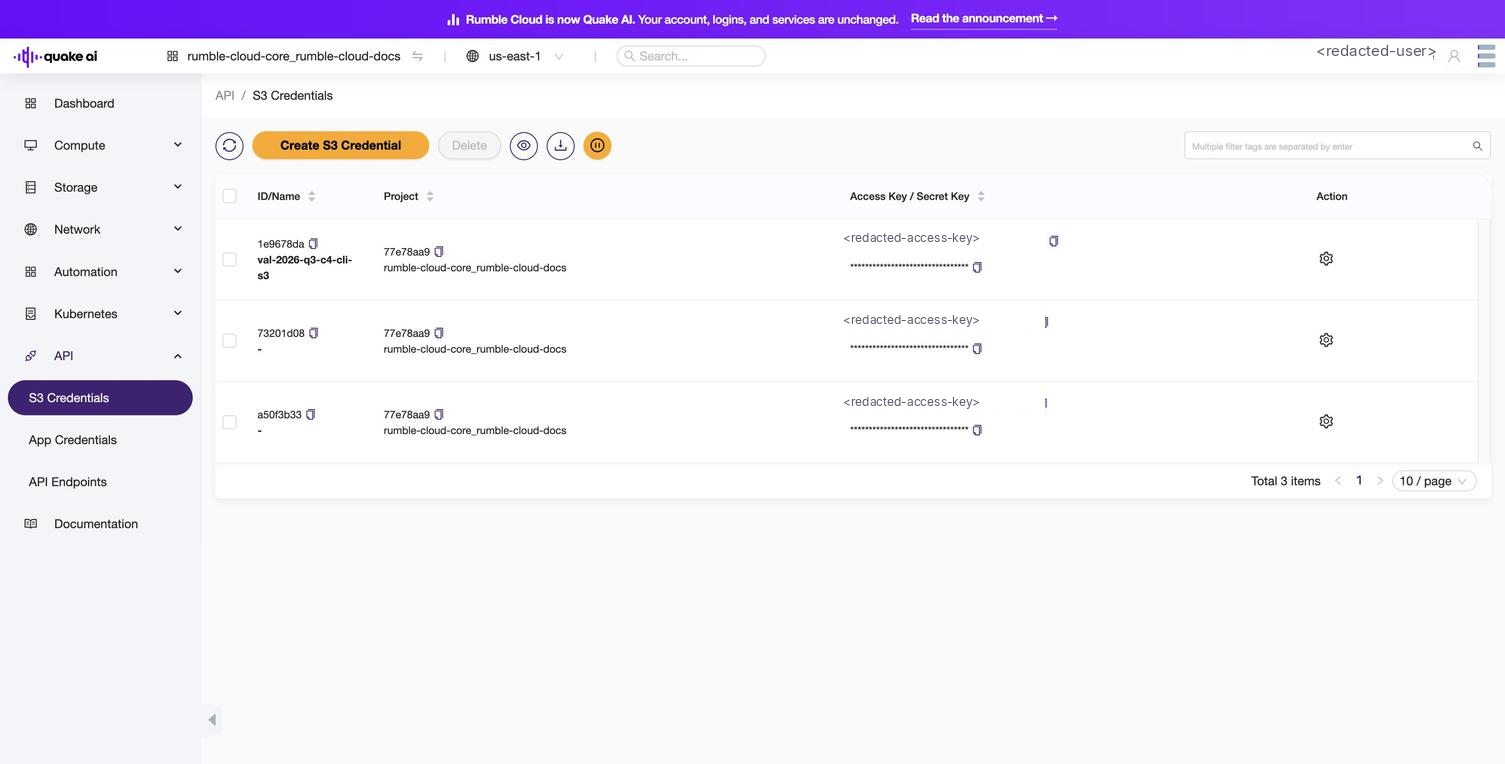
1. Select **API** > **S3 Credentials** in the sidebar.
2. Select **Create S3 Credential**.
3. Provide a descriptive name for the credential (e.g., `backup-scripts`, `rclone-sync`).
4. Select **OK**.
5. The console displays the **Access Key** and **Secret Key** only once. Copy and store them securely.
6. Optionally download the `.cfg` file for use with `s3cmd`.
7. Select **Close**.
```bash
openstack ec2 credentials create
```
The response includes `access` (the access key) and `secret`. Store the secret securely; you cannot retrieve it again.
List existing credentials:
```bash
openstack ec2 credentials list
```
Delete a credential:
```bash
openstack ec2 credentials delete ACCESS_KEY
```
## Verify with AWS CLI
After creating credentials, verify they work by listing your buckets with the AWS CLI. The S3 endpoint depends on your region (for example, `https://object.us-east-1.rumble.cloud`). See [Service Endpoints](/docs/tools/service-endpoints) for all regions.
```bash
aws configure set aws_access_key_id YOUR_ACCESS_KEY
aws configure set aws_secret_access_key YOUR_SECRET_KEY
aws s3 ls --endpoint-url https://object.us-east-1.rumble.cloud # replace with your region
```
Expected output (if you have existing buckets):
```text
2026-03-15 10:30:00 my-bucket
2026-04-01 14:22:00 backup-bucket
```
To list objects in a specific bucket:
```bash
aws s3 ls s3://my-bucket --endpoint-url https://object.us-east-1.rumble.cloud # replace with your region
```
## Configure other S3 tools
### s3cmd
Use the downloaded `.cfg` file directly:
```bash
s3cmd -c s3-CREDENTIAL-NAME.cfg ls
```
Or configure manually. Create `~/.s3cfg`:
```cfg
[default]
access_key = YOUR_ACCESS_KEY
secret_key = YOUR_SECRET_KEY
host_base = object.us-east-1.rumble.cloud # replace with your region
host_bucket = object.us-east-1.rumble.cloud # replace with your region
check_ssl_certificate = True
check_ssl_hostname = True
use_https = True
```
### rclone
```bash
rclone config create rumble s3 \
provider=Other \
access_key_id=YOUR_ACCESS_KEY \
secret_access_key=YOUR_SECRET_KEY \
endpoint=https://object.us-east-1.rumble.cloud # replace with your region
rclone ls quakeai:my-bucket
```
### boto3 (Python)
```python
import boto3
s3 = boto3.client(
"s3",
endpoint_url="https://object.us-east-1.rumble.cloud", # replace with your region
aws_access_key_id="YOUR_ACCESS_KEY",
aws_secret_access_key="YOUR_SECRET_KEY",
)
response = s3.list_buckets()
print([b["Name"] for b in response["Buckets"]])
```
## See also
- [S3 credentials console reference](/docs/tools/s3-credentials): view and manage credentials in the console
- [API access console reference](/docs/tools/api-access-console): overview of the API section
- [Service Endpoints](/docs/tools/service-endpoints): S3 and Swift dual-protocol details
- [Create an object storage bucket](/docs/object/how-to/create-container)
- [Mount S3 storage](/docs/object/how-to/mount-s3-storage)
- [Object storage concepts](/docs/object/concepts/object-storage)