DevOps automation and CI/CD
DevOps automation and CI/CD
Run CI/CD, IaC, and DevOps automation on Quake AI. You operate pipelines, runners, OpenTofu or Heat definitions, and secret stores; Quake AI provides compute for build agents, networking, object storage for artifacts, and OpenStack-compatible APIs for provisioning.
What this is for#
Platform and DevOps teams run their CI/CD and infrastructure-as-code against a provider with predictable compute cost and OpenStack-compatible APIs. Quake AI provides the build-agent compute, the Nova and Heat APIs that OpenTofu and Heat target, and object storage for artifacts and remote state; you operate the pipelines, runners, and state backends. The outcome is a CI and provisioning estate targeting Quake AI, deployable from validated OpenTofu templates and their companion tutorials.
Reference architecture#
Download diagram: SVG, PNG, and PDF.

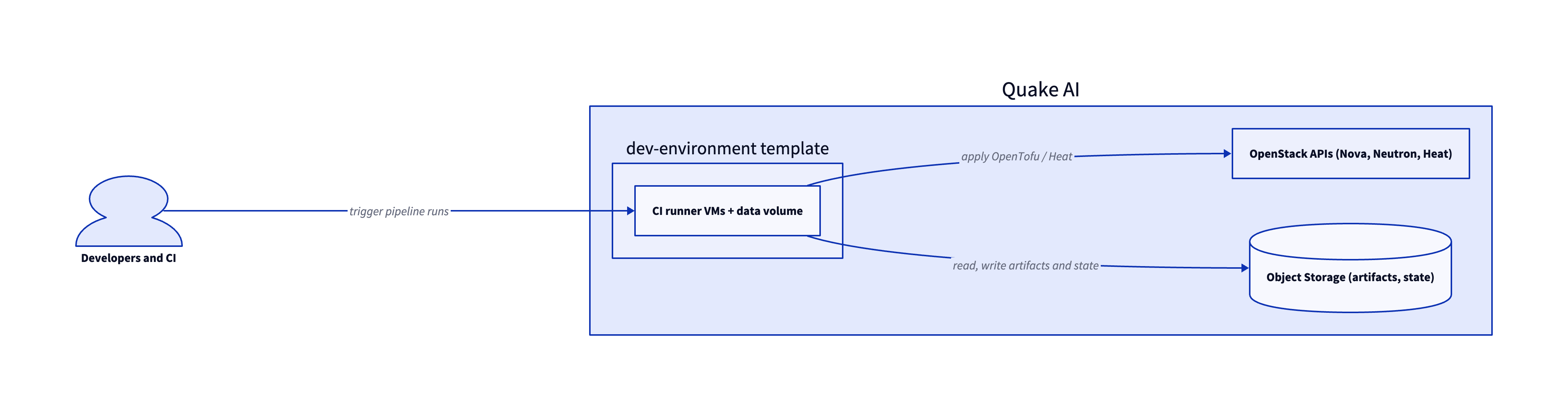
The base is the Development Environment template: the CI runner and toolchain VMs with a data volume. From there the runners call the OpenStack provisioning APIs to apply OpenTofu or Heat, and use Object Storage for build artifacts and remote state.
-
Developers and CI. Commits and merge events trigger pipeline runs on runners you operate.
-
CI runner VMs. Build and deploy agents run on Compute instances. The Development Environment template provisions a runner and toolchain host.
-
OpenStack APIs. Runners call the Nova, Neutron, and Heat APIs through OpenTofu (
openstack_*resources) oropenstack stackcommands to provision and update infrastructure. The Heat Simple Stack template covers an Orchestration entry point. -
Artifacts and state. Build artifacts, container images, and OpenTofu or Heat state live in S3-compatible Object Storage, which the runners read and write across pipeline stages.
Services involved#
| Service | Role in this architecture | Docs |
|---|---|---|
| Compute | Hosts CI runners and build agents | Compute |
| Automation (Heat) | Orchestration API for stack provisioning | Automation |
| Object Storage | Artifacts, container images, and remote state | Object Storage |
| Network | Private networks and security groups for runners | Network |
Get started#
- Development Environment template and its deploy tutorial: OpenTofu bootstrap VM for toolchain installs, remote state experiments, and pipeline dry runs.
- Heat Simple Stack template and its deploy tutorial: minimal Heat stack for teams that standardize on OpenStack Orchestration on Quake AI.
- Migrate from AWS CloudFormation to OpenTofu: map CloudFormation resources to OpenTofu before you cut over production stacks.
- OpenTofu template library: browse validated IaC starting points for automation workloads.
Estimate the cost#
Monthly cost estimate
Pricing calculator ↗Sized as a custom package on shared vCPU.
Monthly total for the required template above. Use the configurator below to add optional pieces and see the total update.
What each resource is for
Bastion host
s1a.small · 2 shared vCPU, 2 GiB RAM, 0.5 Gbps
2× Dev
s1a.medium · 4 shared vCPU, 4 GiB RAM, 0.5 Gbps
Compute shown per role at custom-package rates ($29/dedicated vCPU, $7.25/shared vCPU, $1/GiB RAM). The headline above is the billed total: the cheaper of a named plan and the custom package, plus add-ons.
Included in baseline
s1a.small
2 shared vCPU, 2 GiB RAM, 0.5 Gbps
s1a.medium
4 shared vCPU, 4 GiB RAM, 0.5 Gbps
s1a.medium
4 shared vCPU, 4 GiB RAM, 0.5 Gbps
Compute + RAM rate basis
10 vCPU + 10 GiB RAM at $29/dedicated vCPU, $7.25/shared vCPU, $1/GiB RAM (regular). Totals apply the flat −$5/mo package promotion.
Block storage (160 GiB)
160 GiB at $0.08/GiB/mo
Public IP (included)
1 included with the custom package
Package promotional discount
Flat −$5.00/mo on the custom package (same promotion as named plans).
Included at no charge
These line items are zero on Quake AI. Many other providers meter them separately.
Data transfer (inbound and outbound)
Unlimited data transfer on every plan; Quake AI does not meter per-GB egress.
AWS, GCP, and Azure meter outbound transfer per GB. DigitalOcean and Hetzner include an allowance on compute plans, then charge overage.
Learn morePrivate networking
Private networks, subnets, Neutron routers, and security groups are included with the plan.
VPC objects are usually free to create elsewhere, but NAT gateways bill hourly plus per-GB processed. Quake AI uses router SNAT with no separate NAT line item.
Control-plane API requests
OpenStack API calls for provisioning and management are included.
Some managed services on other clouds meter API calls or charge for premium control-plane features.
Pricing data last validated: . For current rates, check quake.ai/pricing.
Migrating an existing DevOps automation / IaC estate?#
Move a team that already runs CI/CD and infrastructure-as-code on AWS, Azure, GCP, or another hyperscaler. The outcome is the same pipelines and stack definitions targeting Quake AI APIs, with OpenTofu or Heat as the provisioning layer and build agents running on Quake AI compute.
Follow this cutover path. Each step links an existing migration page; this section composes those pages into a workload-shaped sequence rather than duplicating their steps.
-
Map your source provider. Start with the concept-translation page for your current cloud: Coming from AWS, Coming from Azure, Coming from GCP, Coming from DigitalOcean, Coming from Hetzner, Coming from Linode, or Coming from Vultr.
-
Stand up the target shape on Quake AI. Pick the greenfield template that matches how you provision after migration: Development Environment for OpenTofu-first automation and runner hosts, or Heat Simple Stack when Heat remains your orchestration entry point.
-
Translate IaC definitions. Rewrite CloudFormation or CDK stacks with Migrate from AWS CloudFormation to OpenTofu. For compose-defined lab stacks, follow Migrate from Docker Compose.
-
Move build and runner compute. Provision or migrate CI runner VMs with Migrate from EC2 when your agents today run on hyperscaler instances.
-
Switch pipeline targets. Update CI job definitions so
tofu apply,openstack stack create, and deployment stages call Quake AI credentials and endpoints. Run pipeline dry runs against a non-production project before you disable the source account jobs.
Workload-specific cutover callouts#
- IaC translation (CloudFormation/CDK to OpenTofu/Heat). CloudFormation keeps state in AWS; OpenTofu and Heat use client-side or stack-local state you manage. Import existing Quake AI resources into state where possible instead of recreating production objects. Run
tofu planon every translated module before apply. - State migration. Copy or recreate remote state backends (S3, Terraform Cloud, or self-hosted) so the Quake AI workspace owns one canonical state file per stack. Lock state during cutover windows and document who may run apply.
- CI runner switch. Register new runners on Quake AI compute, drain queues on the old pool, then disable source runners so jobs cannot target the previous cloud by mistake. Keep one overlapping runner online until the last scheduled job finishes on the old pool.
- Secret store move. Export CI variables, deployment keys, and cloud credentials from the source vault or provider secret manager. Load them into the store your Quake AI pipelines use, rotate values that cannot move verbatim, and verify signing keys for artifact registries before you merge to the default branch.
Considerations and limits#
- You operate pipelines and state. Quake AI provides compute, storage, and the provisioning APIs; runners, state backends, and secret stores are yours under the shared responsibility model.
- Client-side IaC state. OpenTofu and Heat keep state you manage (a remote backend or stack-local state), not a provider-hosted state service. Lock state during apply windows.
- Flat egress. Quake AI applies a no-egress-fee policy for outbound transfer, which suits artifact pulls and image distribution from CI.
- Three US regions. All current regions are in the United States.
- CPU-only compute. Runners are AMD EPYC with no GPU option (compute FAQ).
- Compliance posture. Quake AI holds SOC 2 Type I and Type II attestations and SOC 3. See Compliance and certifications for the platform scope.