Ecommerce storefronts
Ecommerce storefronts
Run an online storefront on Quake AI with a self-managed edge proxy, an application tier, self-managed Postgres for catalog and orders, Object Storage for product media, and card processing handled by an external PCI-DSS payment processor.
What this is for#
Direct-to-consumer brands, B2C ecommerce teams, and merchants migrating off larger clouds need a storefront tier that serves product pages, holds catalog and order state, and keeps monthly infrastructure cost predictable. Quake AI provides compute, network, and storage; you operate the edge proxy, application, and database and integrate a PCI-DSS payment processor for checkout. Raw card data stays with the processor.
Reference architecture#
Download diagram: SVG, PNG, and PDF.
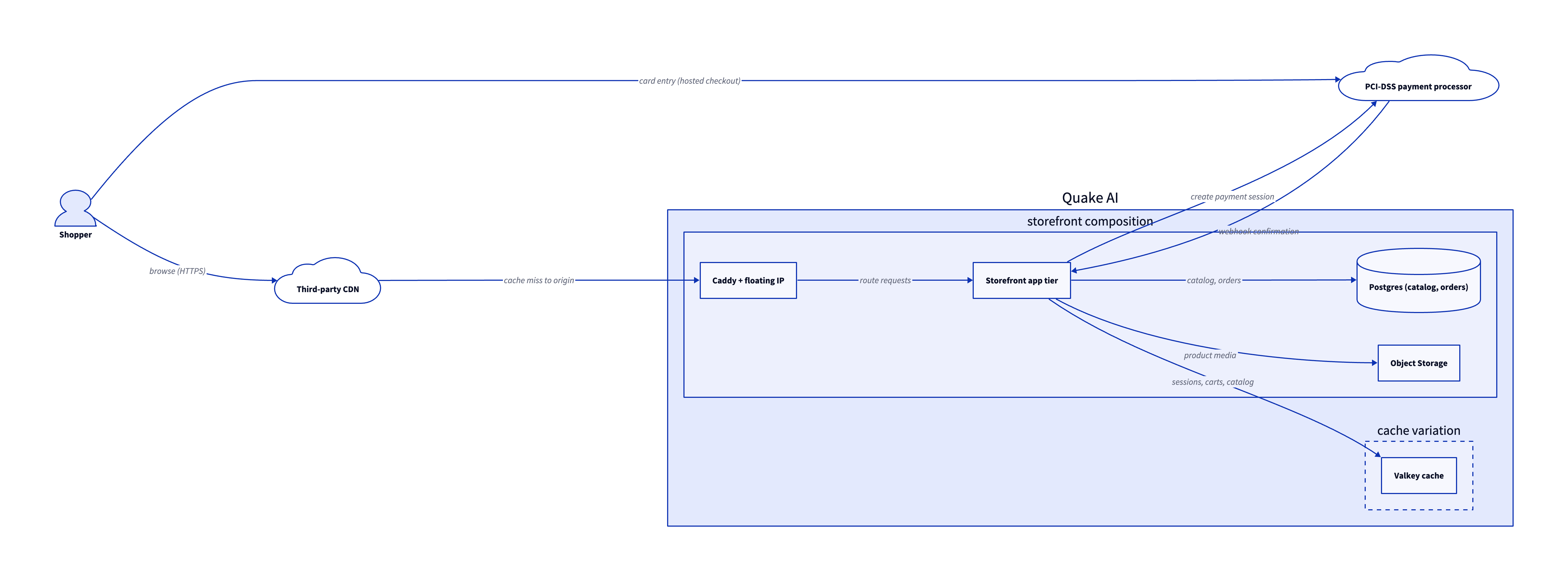
The storefront is six architecture decisions. Each maps to a tier in the diagram above and to the template or how-to that builds it.
-
Front the origin with a CDN. Put a third-party CDN such as Cloudflare, Fastly, or Akamai in front of the storefront. It caches catalog pages and product media close to shoppers and sends cache misses to the floating IP on your edge proxy.
-
Terminate TLS at a self-managed edge proxy. The edge reverse proxy runs Caddy on a floating IP, obtains and renews the storefront certificate, and forwards requests to the application on a private network. Use the edge WAF when you need application-layer filtering.
-
Run the storefront on Compute or Kubernetes. The app serves pages, holds sessions, and calls the payment processor to open checkout sessions. The full-stack app and three-tier app templates provide Compute layouts, and a self-managed Kubernetes cluster fits teams that deploy with Magnum.
-
Keep catalog and order state in self-managed Postgres. Catalog SKUs, inventory, carts, and orders live in self-managed Postgres on Block Storage. The self-managed PostgreSQL template scaffolds this tier.
-
Serve product media from Object Storage. Product images and downloadable assets sit in S3-compatible Object Storage and reach shoppers through the CDN. Upload objects to Object Storage populates the bucket your template provisions.
-
Keep card data with an external PCI-DSS processor. At checkout the shopper submits card data directly to Stripe, Adyen, or another PCI-DSS-attested processor through hosted fields or a redirect. The app receives payment tokens and webhook confirmations only; primary account numbers never reach Quake AI. Quake AI holds SOC 2 attestations and the PCI-DSS scope stays with the processor, so this boundary is the architecture's compliance anchor.
Assemble the storefront from the three-tier app, edge reverse proxy, and self-managed PostgreSQL templates. Add a Valkey host when the application needs a shared cache for sessions, carts, and catalog reads.
Services involved#
| Service | Role in this architecture | Docs |
|---|---|---|
| Compute | Hosts the storefront application tier | Compute |
| Network | Private networks, routers, and security groups for the app tier | Network |
| Floating IPs | Stable public address for the storefront edge | Floating IPs |
| Self-managed edge | TLS termination, routing, and optional request filtering | Edge reverse proxy |
| Object Storage | Product images, downloadable assets, and static exports | Object Storage |
| Block Storage | Postgres data volumes for catalog and order state | Block Storage |
| Self-managed Postgres | Relational catalog, cart, and order data you operate | Self-managed PostgreSQL template |
Get started#
Assemble the tiers from these templates:
- Edge reverse proxy: Caddy with automatic HTTPS on a floating IP.
- Full-stack app template: single-stack OpenTofu pattern with app server, database, and networking.
- Three-tier app template: separate web, application, and database tiers for larger catalogs.
- Self-managed PostgreSQL template: Postgres on Block Storage for catalog and order tables.
- Upload objects to Object Storage: store product media in the object bucket your template provisions.
- OpenTofu template library: browse validated IaC starting points for the tiers above.
Estimate the cost#
Monthly cost estimate
Pricing calculator ↗Sized as a custom package on a mix of shared and dedicated vCPU.
Monthly total for the required template above. Use the configurator below to add optional pieces and see the total update.
What each resource is for
2× Web tier
s1a.small · 2 shared vCPU, 2 GiB RAM, 0.5 Gbps
Serves incoming application traffic and terminates client connections.
Runs on shared CPU because the web tier scales horizontally. Add instances with web_count rather than a larger flavor.
2× App tier
m2a.large · 2 dedicated vCPU, 8 GiB RAM, 0.5 Gbps
Runs the application logic the web tier calls, on a private subnet with no public IP.
Uses general-purpose dedicated CPU for steady request handling.
Database
m2a.xlarge · 4 dedicated vCPU, 16 GiB RAM, 1 Gbps
Runs the database on a private subnet, with a dedicated data volume per instance.
Uses a memory-optimized flavor so the working set stays in RAM.
Proxy
s1a.small · 2 shared vCPU, 2 GiB RAM, 0.5 Gbps
Compute shown per role at custom-package rates ($29/dedicated vCPU, $7.25/shared vCPU, $1/GiB RAM). The headline above is the billed total: the cheaper of a named plan and the custom package, plus add-ons.
Included in baseline
s1a.small
2 shared vCPU, 2 GiB RAM, 0.5 Gbps
s1a.small
2 shared vCPU, 2 GiB RAM, 0.5 Gbps
m2a.large
2 dedicated vCPU, 8 GiB RAM, 0.5 Gbps
m2a.large
2 dedicated vCPU, 8 GiB RAM, 0.5 Gbps
m2a.xlarge
4 dedicated vCPU, 16 GiB RAM, 1 Gbps
s1a.small
2 shared vCPU, 2 GiB RAM, 0.5 Gbps
Compute + RAM rate basis
14 vCPU + 38 GiB RAM at $29/dedicated vCPU, $7.25/shared vCPU, $1/GiB RAM (regular). Totals apply the flat −$5/mo package promotion.
Block storage (180 GiB)
180 GiB at $0.08/GiB/mo
Public IPs (+1)
1 included, 1 add-on
Package promotional discount
Flat −$5.00/mo on the custom package (same promotion as named plans).
Included at no charge
These line items are zero on Quake AI. Many other providers meter them separately.
Data transfer (inbound and outbound)
Unlimited data transfer on every plan; Quake AI does not meter per-GB egress.
AWS, GCP, and Azure meter outbound transfer per GB. DigitalOcean and Hetzner include an allowance on compute plans, then charge overage.
Learn morePrivate networking
Private networks, subnets, Neutron routers, and security groups are included with the plan.
VPC objects are usually free to create elsewhere, but NAT gateways bill hourly plus per-GB processed. Quake AI uses router SNAT with no separate NAT line item.
Control-plane API requests
OpenStack API calls for provisioning and management are included.
Some managed services on other clouds meter API calls or charge for premium control-plane features.
Dev/test vs production
Start on shared CPU for dev/test, then promote to dedicated for production with a flavor resize. The network, storage, and template stay the same.
Dev/test on shared CPU
Burstable s1a flavors; suited to prototyping and low or bursty load.
Production on the configured CPU
The headline estimate above; predictable steady-load performance.
Saves $198.00/mo while you build on shared CPU.
Shared flavors carry less RAM (m2a.large (8 GiB RAM) -> s1a.small (2 GiB RAM); m2a.xlarge (16 GiB RAM) -> s1a.medium (4 GiB RAM)). A resize reboots the instance; data on attached volumes persists. Size the dedicated flavor for the RAM your production workload needs.
Pricing data last validated: . For current rates, check quake.ai/pricing.
Migrating an existing ecommerce storefront?#
Move a direct-to-consumer or B2C store that runs on Shopify, WooCommerce, or a self-hosted stack at another cloud. The outcome is the same storefront on Quake AI compute, with catalog and order data on self-managed Postgres, product media in Object Storage, and checkout still handled by your external PCI-DSS payment processor. Card data stays with the processor throughout; you never copy primary account numbers onto Quake AI.
Follow this cutover path. Each step links an existing migration page; this section composes those pages into a workload-shaped sequence rather than duplicating their steps.
-
Map your source provider. Start with the concept-translation page for your current cloud: Coming from AWS, Coming from Azure, Coming from GCP, Coming from DigitalOcean, or Coming from Hetzner.
-
Stand up the target shape on Quake AI. Deploy the edge reverse proxy for the public HTTPS endpoint, the three-tier app for separate web, application, and database tiers, and self-managed PostgreSQL for the catalog and order database.
-
Move compute workloads. For a self-hosted store on VMs at another cloud, follow Migrate from EC2. For a fully managed source such as Shopify, export your catalog and theme and redeploy the storefront application onto the target template instead of lifting a VM.
-
Move product media. Sync product images, downloadable assets, and static exports into your Object Storage bucket with Migrate from S3.
-
Recreate network topology and security rules. Translate VPCs, subnets, and security groups with Migrate from AWS VPC (or the matching network migration page for your source provider).
-
Cut over traffic. Add the target application to your edge proxy, verify checkout and health endpoints, then switch DNS to the edge proxy floating IP. Use CDN or DNS weights when you need a gradual rollout.
Workload-specific cutover callouts#
- Catalog and order database cutover. Dump the source catalog, inventory, and order tables and restore them into self-managed Postgres on the target stack. For an active store, take a baseline dump, then apply a final incremental sync during a short write freeze so no orders are lost between the dump and the DNS switch. Validate row counts and order totals on the target before cutover.
- Product media bucket sync. Copy product images and assets into Object Storage before the switch, then run a second sync pass for any objects added during migration. Confirm the storefront resolves media URLs against the new bucket.
- Payment processor continuity. Keep checkout pointed at your external PCI-DSS payment processor across the move. Update webhook endpoints and return URLs to the new storefront hostname, and confirm test-mode payments succeed before you take production traffic. Never migrate card data onto Quake AI; the processor holds it on both sides of the move.
- DNS and TLS switch. Lower TTL on the production hostname several days before cutover and verify that the edge proxy has obtained the production certificate. Keep the source store warm until order rates and error budgets stabilize on the target.
- Zero-downtime cutover and rollback. Run the new storefront in parallel behind a canary weight, shift traffic gradually, and watch checkout success rates. Roll back by pointing DNS at the old origin if health checks or payment confirmations fail.
For a hands-on walkthrough of this vertical, follow Migrate an ecommerce storefront to Quake AI.
Considerations and limits#
- PCI-DSS and card data. Quake AI holds SOC 2 Type I and Type II attestations but is not PCI-DSS attested. Offload card-data processing to a PCI-DSS-compliant payment processor; do not store, transmit, or process raw card data on Quake AI infrastructure. See Compliance and certifications for the platform scope.
- Compliance posture. SOC 2 and SOC 3 cover the cloud infrastructure tier. Your storefront application, payment integration, and merchant policies remain your responsibility under the shared responsibility model.
- No managed database or CDN. Postgres, cache layers, and search indexes run on Compute or Block Storage you operate. Static acceleration requires a third-party CDN in front of the origin.
- Flat egress. Quake AI applies a no-egress-fee policy for outbound transfer from your resources, which helps storefronts that serve large product media files.
- Three US regions. All current regions are in the United States. A globally distributed storefront needs CDN coverage and, if required, additional origin regions outside Quake AI today.
- CPU-only compute. Storefront runtimes are CPU-bound; Quake AI flavors are AMD EPYC with no GPU option (compute FAQ).
- When this pattern is not the right fit.
- Merchants who require PCI-DSS attestation on the infrastructure tier itself rather than on a dedicated payment processor.
- Teams that need a fully managed ecommerce platform (catalog SaaS, managed checkout, or marketplace operator services) instead of a self-hosted stack.
- Workloads that require HIPAA, FedRAMP, or ISO 27001 attestations beyond the platform's current compliance scope.