Feature flags and experiments
Feature flags and experiments
Roll out feature flags, gradual releases, and A/B experiments on a self-hosted Unleash instance. You operate flags, strategies, and experiments; Quake AI provides the Compute instance, network, and block storage the platform runs on.
What this is for#
Teams that ship behind flags need a place to define flags, gradual-rollout strategies, and experiments that both the web UI and running services can read. Unleash (a self-hosted alternative to LaunchDarkly or Flagsmith) gives a team that place, running on infrastructure you own instead of a per-seat SaaS. The outcome is a feature-flags backend your services query over its SDK API, deployable from a validated OpenTofu template and its companion tutorial.
Reference architecture#
Download diagram: SVG, PNG, and PDF.

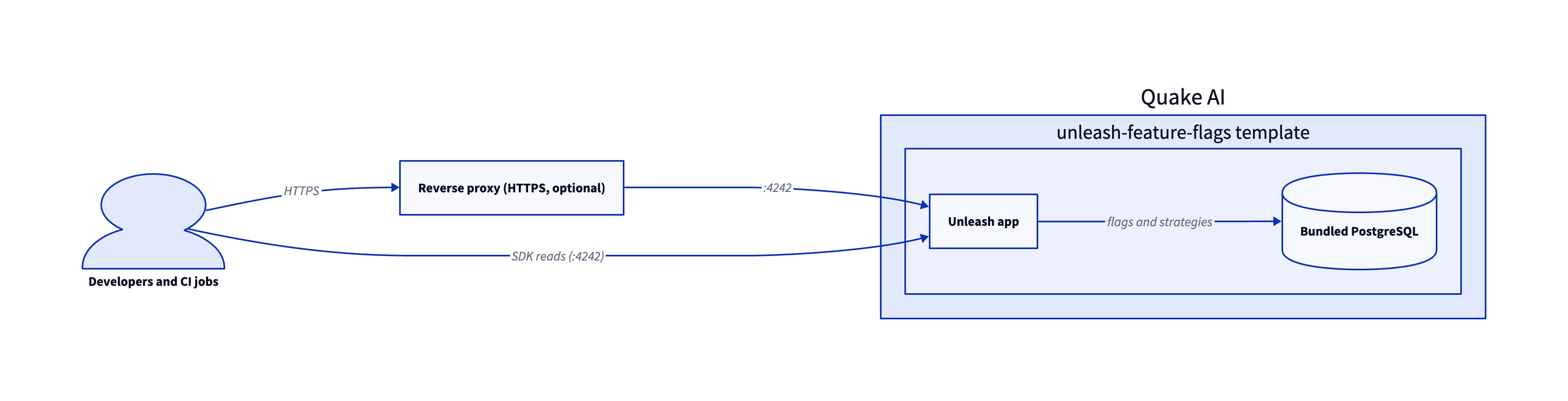
The base is a single validated template: Unleash feature flags provisions the instance, network, and volume Unleash runs on.
-
Developers and CI jobs. Developers manage flags and strategies through Unleash's web UI; running services read flag state through Unleash's SDKs against the app's API.
-
Reverse proxy (optional). For production use, the edge reverse proxy template terminates HTTPS on a floating IP in front of Unleash. Unleash is reachable immediately after boot without one, since
UNLEASH_URLonly affects links in outgoing emails and integrations. -
Unleash app. The Unleash feature flags template runs Unleash in Docker on a Compute instance, alongside a bundled PostgreSQL.
-
Bundled datastore. PostgreSQL stores flags, strategies, and experiment configuration, backed by a Block Storage volume.
Services involved#
| Service | Role in this architecture | Docs |
|---|---|---|
| Compute | Hosts Unleash and its bundled PostgreSQL | Compute |
| Network | Private network, security group, and floating IP for public access | Network |
| Block Storage | Volume backing the database data | Block Storage |
Get started#
- Unleash feature flags template: OpenTofu pattern that provisions the instance, network, and volume; the app is reachable immediately after boot with a default admin login you change on first access.
- OpenTofu template library: browse validated IaC starting points for other self-hosted team tools.
Estimate the cost#
Monthly cost estimate
Pricing calculator ↗Sized as a custom package on shared vCPU.
Monthly total for the required template above. Use the configurator below to add optional pieces and see the total update.
What each resource is for
Unleash feature-flags host
s1a.medium · 4 shared vCPU, 4 GiB RAM, 0.5 Gbps
Runs Unleash's app container alongside a bundled PostgreSQL, with the database data on an attached volume.
Unleash plus its bundled PostgreSQL runs on 4 vCPU and 4 GiB RAM. Size up for many concurrent SDK connections or a large flag inventory.
Compute shown per role at custom-package rates ($29/dedicated vCPU, $7.25/shared vCPU, $1/GiB RAM). The headline above is the billed total: the cheaper of a named plan and the custom package, plus add-ons.
Included in baseline
s1a.medium
4 shared vCPU, 4 GiB RAM, 0.5 Gbps
Compute + RAM rate basis
4 vCPU + 4 GiB RAM at $29/dedicated vCPU, $7.25/shared vCPU, $1/GiB RAM (regular). Totals apply the flat −$5/mo package promotion.
Block storage (45 GiB)
45 GiB at $0.08/GiB/mo
Public IP (included)
1 included with the custom package
Package promotional discount
Flat −$5.00/mo on the custom package (same promotion as named plans).
Included at no charge
These line items are zero on Quake AI. Many other providers meter them separately.
Data transfer (inbound and outbound)
Unlimited data transfer on every plan; Quake AI does not meter per-GB egress.
AWS, GCP, and Azure meter outbound transfer per GB. DigitalOcean and Hetzner include an allowance on compute plans, then charge overage.
Learn morePrivate networking
Private networks, subnets, Neutron routers, and security groups are included with the plan.
VPC objects are usually free to create elsewhere, but NAT gateways bill hourly plus per-GB processed. Quake AI uses router SNAT with no separate NAT line item.
Control-plane API requests
OpenStack API calls for provisioning and management are included.
Some managed services on other clouds meter API calls or charge for premium control-plane features.
Configure your estimate
Check the add-ons you plan to deploy to build a monthly total. Nothing is selected to start, so the total below begins at the baseline.
Starting template
The required baseline, always included.
Pricing data last validated: . For current rates, check quake.ai/pricing.
Considerations and limits#
- You operate flag hygiene. Quake AI provisions the instance; flag lifecycle, stale-flag cleanup, and access control are yours under the shared responsibility model.
- Change the default admin password immediately. The template ships with a default local admin login (
admin/unleash4all) reachable as soon as the containers start. Change it before exposing the instance beyond the private network. - Single-instance bundled datastore. The bundled PostgreSQL suits a single-team deployment. To scale it independently, point Unleash at a self-managed PostgreSQL instance.
- Flat egress. Quake AI applies a no-egress-fee policy for outbound transfer, which keeps high-frequency SDK flag reads predictable.
- Three US regions. All current regions are in the United States.
- Compliance posture. Quake AI holds SOC 2 Type I and Type II attestations and SOC 3. See Compliance and certifications for the platform scope.