AI-native development
AI-native development
Use Quake AI Developer as a first-class context source for the AI coding tools your team already runs, then run and operate what you build on Quake AI Compute you control. The always-on apps and agents you deploy are a control plane you own, from the solo builder running one agent to a team running many.
What this is for#
Engineering teams that build with AI coding assistants need documentation that those tools can fetch without copy-paste from rendered HTML. Quake AI Developer exposes plain markdown, standard llms.txt corpora, a hosted MCP server, and a knowledge graph so Cursor, Claude Desktop, VS Code Copilot, and custom MCP clients retrieve current answers. The outcome is less context-switching, tighter links from a question to a validated OpenTofu template or doc anchor, and IaC drafts you can run through tofu validate before apply.
A control plane you operate#
The same builder who drafts infrastructure with an AI assistant also runs the long-lived result on Quake AI: an API, a scheduled job, or an always-on agent on Compute you own. The durable runtime, your data, and your provider credentials stay on instances inside your project, and any heavy model inference is a call out to a model backend you choose.
OpenClaw, a one-click Console App, is a concrete example: a persistent AI agent on a Quake AI CPU VM that drives external model providers, or a local model through Ollama, with your keys and conversation data on the VM you own. For a model-routing tier that fans out to several backends, the inference gateway template builds the same pattern as a standalone service, and AI inference and RAG pipelines covers the full control-plane layout.
Reference architecture#
Download diagram: SVG, PNG, and PDF.

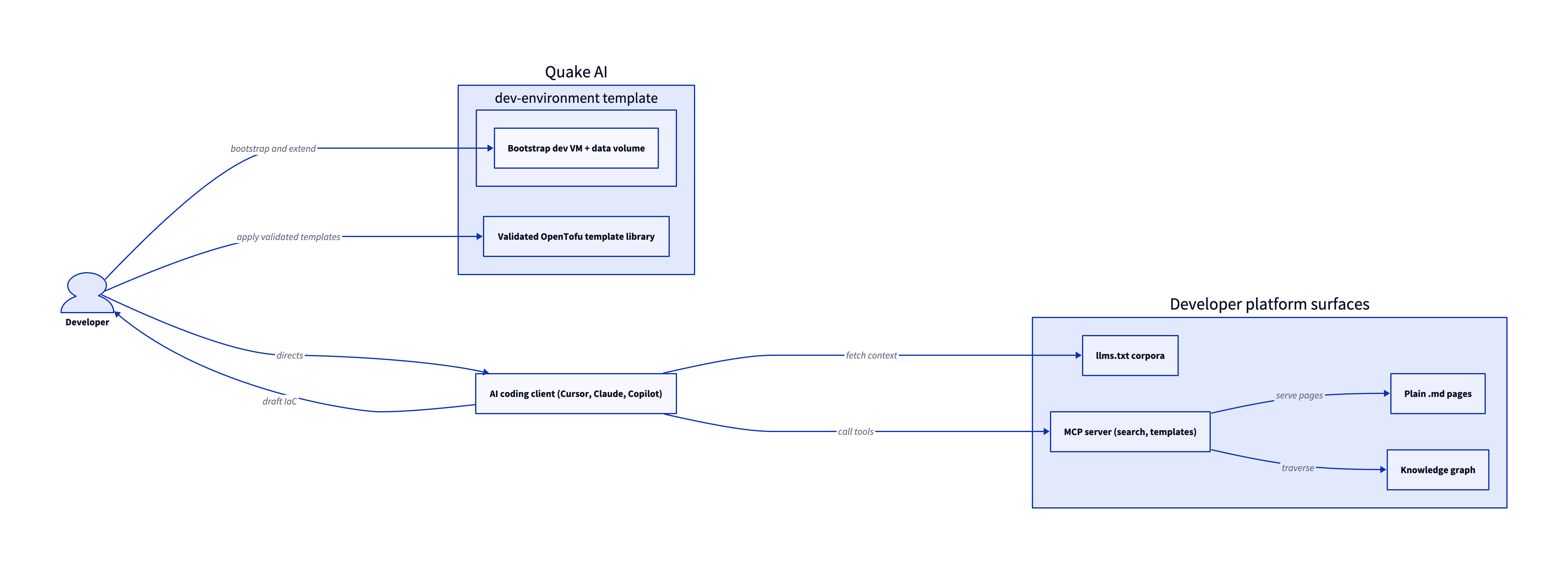
This pattern has two halves. The developer platform surfaces (llms.txt corpora, plain .md pages, the MCP server, and the knowledge graph) are the context the AI client retrieves; the deployable half is Quake AI, where the developer applies drafted IaC against the validated template library and a Development Environment bootstrap VM you extend with your toolchain.
-
AI coding client. Cursor, Claude Desktop, ChatGPT with a custom GPT, VS Code Copilot in agent mode, or a custom MCP client in CI connects to the developer platform. The client fetches
https://docs.rumble.cloud/llms.txt,https://docs.rumble.cloud/llms-full.txt, and individual pages athttps://docs.rumble.cloud/docs/{slug}.mdwhen MCP is not available. -
MCP tools. The hosted MCP endpoint at
https://docs.quake.ai/api/mcpexposes callable tools for documentation search and OpenTofu and Heat template retrieval. The client invokes tools over standard MCP transport; no Quake AI account is required to install the server. -
Knowledge graph and topical index.
https://docs.rumble.cloud/knowledge-graph.jsonandhttps://docs.rumble.cloud/topical-index.jsonexpose services, concepts, templates, and doc relationships. Clients that traverse typed edges retrieve related pages beyond a single keyword hit. -
Infrastructure scaffolding. The developer applies generated or adapted OpenTofu, Heat, or console workflows on Quake AI. The OpenTofu template library is the deterministic target: sixteen validated templates cover compute, network, storage, Kubernetes, and full-stack patterns.
-
Optional inference workloads. Teams that also run models on Quake AI can follow AI inference and RAG pipelines for CPU-only self-hosted inference, Qdrant, and small LLMs via Ollama, separate from using the developer platform as a doc surface.
Services involved#
| Service | Role in this architecture | Docs |
|---|---|---|
| Plain markdown doc pages | Each doc route is available as .md for tools that prefer raw markdown | Quake AI platform |
llms.txt and llms-full.txt | Standard corpora packaging the documentation for bulk context load | How to connect AI tools |
| MCP server | Callable search, template, and metadata tools for MCP-compatible clients | AI tools reference |
| Knowledge graph | Relationship-aware retrieval across services, concepts, and templates | Knowledge catalog |
| Topical index | Topic-grouped doc index generated at build time | Catalog A-Z |
| Self-hosted AI | Optional inference stack on Quake AI compute | Self-hosted AI on cloud infrastructure |
| AI inference and RAG (Solutions) | Workload pattern for deploying inference on Quake AI | AI inference and RAG pipelines |
Get started#
- How to connect AI tools to Quake AI docs: MCP setup for Cursor, Claude Desktop, VS Code, Continue, and Zed, plus URLs for non-MCP tools.
- AI tools reference: MCP tool inputs, response shapes, and
knowledge-graph.jsonschema. - Self-hosted AI on cloud infrastructure: when to run models on your own VMs on Quake AI.
- Development Environment template: OpenTofu pattern for a bootstrap dev VM you can extend with your AI toolchain.
- Deploy the development environment template: step-by-step walkthrough for the bootstrap dev VM.
- Next.js app template and its deploy walkthrough: take an app you drafted with an AI coding tool from a local build to a TLS-served Next.js deployment on Quake AI.
- Inference gateway template and its deploy walkthrough: a model-routing endpoint for the agents and apps you run on Quake AI.
- Run a Cursor SDK agent in CI: invoke a Cursor SDK agent from a CI job on a self-hosted runner, for a PR-review or doc-generation task.
- OpenTofu template library: validated IaC starting points the MCP
get_templatetool returns. - AI inference and RAG pipelines: deploy inference workloads on Quake AI infrastructure.
Estimate the cost#
Monthly cost estimate
Pricing calculator ↗Sized as a custom package on shared vCPU.
Monthly total for the required template above. Use the configurator below to add optional pieces and see the total update.
What each resource is for
Bastion host
s1a.small · 2 shared vCPU, 2 GiB RAM, 0.5 Gbps
2× Dev
s1a.medium · 4 shared vCPU, 4 GiB RAM, 0.5 Gbps
Compute shown per role at custom-package rates ($29/dedicated vCPU, $7.25/shared vCPU, $1/GiB RAM). The headline above is the billed total: the cheaper of a named plan and the custom package, plus add-ons.
Included in baseline
s1a.small
2 shared vCPU, 2 GiB RAM, 0.5 Gbps
s1a.medium
4 shared vCPU, 4 GiB RAM, 0.5 Gbps
s1a.medium
4 shared vCPU, 4 GiB RAM, 0.5 Gbps
Compute + RAM rate basis
10 vCPU + 10 GiB RAM at $29/dedicated vCPU, $7.25/shared vCPU, $1/GiB RAM (regular). Totals apply the flat −$5/mo package promotion.
Block storage (160 GiB)
160 GiB at $0.08/GiB/mo
Public IP (included)
1 included with the custom package
Package promotional discount
Flat −$5.00/mo on the custom package (same promotion as named plans).
Included at no charge
These line items are zero on Quake AI. Many other providers meter them separately.
Data transfer (inbound and outbound)
Unlimited data transfer on every plan; Quake AI does not meter per-GB egress.
AWS, GCP, and Azure meter outbound transfer per GB. DigitalOcean and Hetzner include an allowance on compute plans, then charge overage.
Learn morePrivate networking
Private networks, subnets, Neutron routers, and security groups are included with the plan.
VPC objects are usually free to create elsewhere, but NAT gateways bill hourly plus per-GB processed. Quake AI uses router SNAT with no separate NAT line item.
Control-plane API requests
OpenStack API calls for provisioning and management are included.
Some managed services on other clouds meter API calls or charge for premium control-plane features.
Configure your estimate
Check the add-ons you plan to deploy to build a monthly total. Nothing is selected to start, so the total below begins at the baseline.
Starting template
The required baseline, always included.
Pricing data last validated: . For current rates, check quake.ai/pricing.
Considerations and limits#
- Compliance posture. Quake AI holds SOC 2 Type I and Type II attestations. See Compliance and certifications for scope. This Solutions page describes developer tooling surfaces, not a regulated workload attestation.
- The developer platform surface evolves. Endpoints and MCP tools ship with the documentation set. AI clients should fetch the current
llms.txt, MCP tool list, and per-page.mdroutes rather than caching a long-lived snapshot. - MCP tool availability. Not every Quake AI API operation is exposed as an MCP tool. The MCP server is a curated read surface; mutating operations use the documented REST APIs and OpenStack-compatible clients.
- No platform-managed AI client. You bring Cursor, Claude, Copilot, or a custom MCP client. The platform supplies context and doc-backed tools; it does not ship an IDE or chat product.
- AI client output is not authoritative. Run
tofu validateand compare generated IaC to canonical templates before apply. MCP tools return doc-backed artifacts where possible; synthesis on top of those artifacts is your responsibility. - When this pattern is not the right fit.
- Teams that standardize on manual docs and consoles only, with no AI-assisted authoring.
- Teams whose security posture blocks outbound HTTPS from AI clients to
docs.rumble.cloud. - Teams whose tooling cannot use MCP,
llms.txt, or plain-markdown fetches and will not maintain a custom integration.