Creator businesses
Creator businesses
Run the back end of a creator business on Quake AI: archive of record, batch processing, distribution origin, and an audience-owned surface. You operate transcoding, inference workers, the edge proxy, and the audience site; Quake AI provides CPU compute, object storage, networking, and floating IPs.
What this is for#
Creators and small studios that want to own their archive and audience run the back end themselves. Quake AI provides object storage for masters and renders and CPU compute for batch transcode and inference workers; you operate the processing pipeline, edge proxy, and audience surface.
Reference architecture#
Download diagram: SVG, PNG, and PDF.

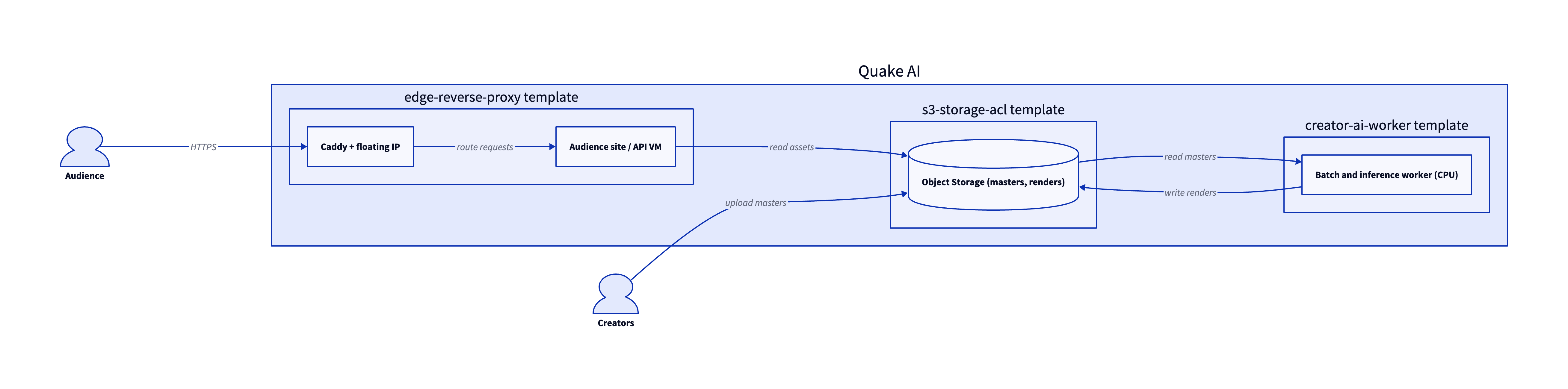
Three validated templates compose the back end: the edge reverse proxy publishes the audience site or API with automatic HTTPS, the Creator-AI inference worker runs batch transcode and inference jobs, and S3 Storage with ACLs holds the archive of masters and renders.
-
Creator and audience. Creators upload masters and manage the pipeline; the audience reaches the distribution site or API over HTTPS.
-
Edge reverse proxy with TLS. The edge reverse proxy runs Caddy on a floating IP, obtains a certificate for your domain, and routes requests to the audience site or API.
-
Audience site or API. A membership site, distribution origin, or private API runs on Compute VMs behind the edge reverse proxy.
-
Batch and inference workers. Transcode, caption, summarize, and index jobs run on Compute workers. The Creator-AI inference worker template scaffolds the CPU inference stack.
-
Object Storage archive. Masters, renders, captions, and distribution assets live in S3-compatible Object Storage, which both the workers and the audience tier read from.
Services involved#
| Service | Role in this architecture | Docs |
|---|---|---|
| Compute | Hosts the audience tier and the batch and inference workers | Compute |
| Network | Private networks, routers, and security groups | Network |
| Floating IPs | Stable public address for the edge VM | Floating IPs |
| Edge reverse proxy | TLS termination and routing for the audience site or API | Edge reverse proxy |
| Object Storage | Archive of masters, renders, captions, and assets | Object Storage |
Get started#
- Simple VM template: single VM with floating IP for batch workers, ingest hooks, or a private processing node.
- Deploy the Simple VM template: step-by-step walkthrough for a single Compute instance with a floating IP.
- Edge reverse proxy template: Caddy-based public tier for a membership site, API, or distribution origin.
- Deploy the edge reverse proxy template: publish a membership site or API with automatic HTTPS.
- Deploy the Creator-AI inference worker template: CPU inference stack for transcribe, summarize, and index routes.
- Upload objects to Object Storage: land raw media, renders, and exports in the bucket your templates provision.
- OpenTofu template library: browse validated IaC starting points for creator back-end layouts.
Estimate the cost#
Monthly cost estimate
Pricing calculator ↗Sized as a custom package on dedicated vCPU.
Monthly total for the required template above. Use the configurator below to add optional pieces and see the total update.
What each resource is for
Inference
c2a.large · 2 dedicated vCPU, 4 GiB RAM, 0.5 Gbps
Compute shown per role at custom-package rates ($29/dedicated vCPU, $7.25/shared vCPU, $1/GiB RAM). The headline above is the billed total: the cheaper of a named plan and the custom package, plus add-ons.
Included in baseline
c2a.large
2 dedicated vCPU, 4 GiB RAM, 0.5 Gbps
Compute + RAM rate basis
2 vCPU + 4 GiB RAM at $29/dedicated vCPU, $7.25/shared vCPU, $1/GiB RAM (regular). Totals apply the flat −$5/mo package promotion.
Block storage (80 GiB)
80 GiB at $0.08/GiB/mo
Package promotional discount
Flat −$5.00/mo on the custom package (same promotion as named plans).
Object storage (usage-based)
Object storage
1 bucket. The first 1 TB is included, then $10.00 per TB each month. You pay for what you store, so this line depends on usage.
Assumes: 2 TB stored is $10/mo; 5 TB stored is $40/mo. Within the included allotment it stays $0.
Included at no charge
These line items are zero on Quake AI. Many other providers meter them separately.
Data transfer (inbound and outbound)
Unlimited data transfer on every plan; Quake AI does not meter per-GB egress.
AWS, GCP, and Azure meter outbound transfer per GB. DigitalOcean and Hetzner include an allowance on compute plans, then charge overage.
Learn moreObject storage upload and download
No separate charges for uploading or downloading object storage data.
Most object storage providers meter egress and API requests separately from stored capacity.
Learn morePrivate networking
Private networks, subnets, Neutron routers, and security groups are included with the plan.
VPC objects are usually free to create elsewhere, but NAT gateways bill hourly plus per-GB processed. Quake AI uses router SNAT with no separate NAT line item.
Control-plane API requests
OpenStack API calls for provisioning and management are included.
Some managed services on other clouds meter API calls or charge for premium control-plane features.
Configure your estimate
Check the add-ons you plan to deploy to build a monthly total. Nothing is selected to start, so the total below begins at the baseline.
Starting template
The required baseline, always included.
Pick how much you expect to store to fold it into the total.
Dev/test vs production
Start on shared CPU for dev/test, then promote to dedicated for production with a flavor resize. The network, storage, and template stay the same.
Dev/test on shared CPU
Burstable s1a flavors; suited to prototyping and low or bursty load.
Production on dedicated CPU
The headline estimate above; predictable steady-load performance.
Saves $45.50/mo while you build on shared CPU.
Shared flavors carry less RAM (c2a.large (4 GiB RAM) -> s1a.small (2 GiB RAM)). A resize reboots the instance; data on attached volumes persists. Size the dedicated flavor for the RAM your production workload needs.
Pricing data last validated: . For current rates, check quake.ai/pricing.
Migrating an existing creator business workload?#
Move a creator or studio back end that already runs on AWS EC2 and S3, Azure VMs and Blob, Google Compute Engine and Cloud Storage, or another hyperscaler where you operate the integration layer yourself. The outcome is the same media archive, processing workers, and audience-facing origin on Quake AI, with object buckets, worker fleets, and public endpoints cut over in a controlled order.
Follow this cutover path. Each step links an existing migration page; this section composes those pages into a workload-shaped sequence rather than duplicating their steps.
-
Map your source provider. Start with the concept-translation page for your current cloud: Coming from AWS, Coming from Azure, Coming from GCP, Coming from DigitalOcean, or Coming from Hetzner.
-
Stand up the target shape on Quake AI. Pick the template that matches the workload: Simple VM for batch or inference workers, or edge reverse proxy for an audience site or API with automatic HTTPS.
-
Move compute workloads. Rebuild transcoding, inference, and automation workers with Migrate from EC2 (or the matching compute migration page for your source provider).
-
Move object and media data. Sync master files, renders, captions, and distribution assets with Migrate from S3 (or the matching object migration page for your source provider).
-
Cut over the public endpoint. Stage the audience site or API behind the edge reverse proxy, validate signed URLs and embed behavior, then switch DNS to its floating IP or update client base URLs for private integrations.
Workload-specific cutover callouts#
- Media-asset bucket sync. Copy source buckets before you switch production traffic. Validate object counts, checksums on large masters, and CDN or signed-URL behavior against the Quake AI bucket paths you provisioned.
- Worker VM rebuild. Batch transcode, inference, and ingest workers rarely lift-and-shift cleanly. Rebuild images on Quake AI, replay
cloud-initor container bootstrap, and run a full pipeline dry run before you cut over scheduled jobs. - DNS and endpoint switch. Lower TTL on the production hostname several days before cutover. Keep the source origin warm until playback, upload, and webhook error rates stabilize. Roll back by switching DNS or client base URLs back to the old endpoint if health checks fail.
- CPU-only workloads. CPU workers fit batch transcode, smaller models, and caption or summarize jobs on Quake AI (compute FAQ). GPU-heavy transcode or real-time inference at production scale needs accelerators outside this flavor catalog.
Considerations and limits#
- You operate the pipeline. Quake AI provides compute, storage, networking, and floating IPs; the transcode pipeline, inference workers, edge proxy, and audience application are yours to build and operate under the shared responsibility model.
- CPU-only compute. Compute is AMD EPYC with no GPU option (compute FAQ). Size workers for batch transcode and smaller models; GPU-heavy real-time inference needs a different hosting path.
- No managed database or CDN. Catalog and metadata stores run on Compute or Block Storage you operate. Static and media acceleration requires a third-party CDN in front of the origin.
- Flat egress. Quake AI applies a no-egress-fee policy for outbound transfer, which suits creators who serve large media files to an audience.
- Three US regions. All current regions are in the United States. Global distribution needs CDN coverage in front of the origin.
- Compliance posture. Quake AI holds SOC 2 Type I and Type II attestations and SOC 3. See Compliance and certifications for the platform scope.