Indie multiplayer game servers
Indie multiplayer game servers
Host community-scale multiplayer servers on Quake AI for titles that ship their own dedicated server binary. You operate the server process, mods, and save data; Quake AI provides the compute, networking, block storage, and object storage underneath.
What this is for#
This pattern covers community-scale multiplayer servers for titles that ship their own server binary: Minecraft, Valheim, Factorio, Project Zomboid, Palworld, ARK survival, and dedicated Counter-Strike 2 community servers. It does not cover AAA-scale fleet management (a GameLift-equivalent), anycast or global-edge latency steering, or GPU-accelerated game-engine workloads.
Content creators running servers for their communities, indie multiplayer enthusiasts, and small studios running closed beta servers get a dedicated host with a stable public address and durable save data. Quake AI provides the VM, the Floating IP for the game port, and the Block Storage volume for world and save data; you operate the server process, mods, and backups. The outcome is a community game server with flat egress and plan-based compute pricing, deployable from a validated OpenTofu template and its companion tutorial.
Reference architecture#
Download diagram: SVG, PNG, and PDF.

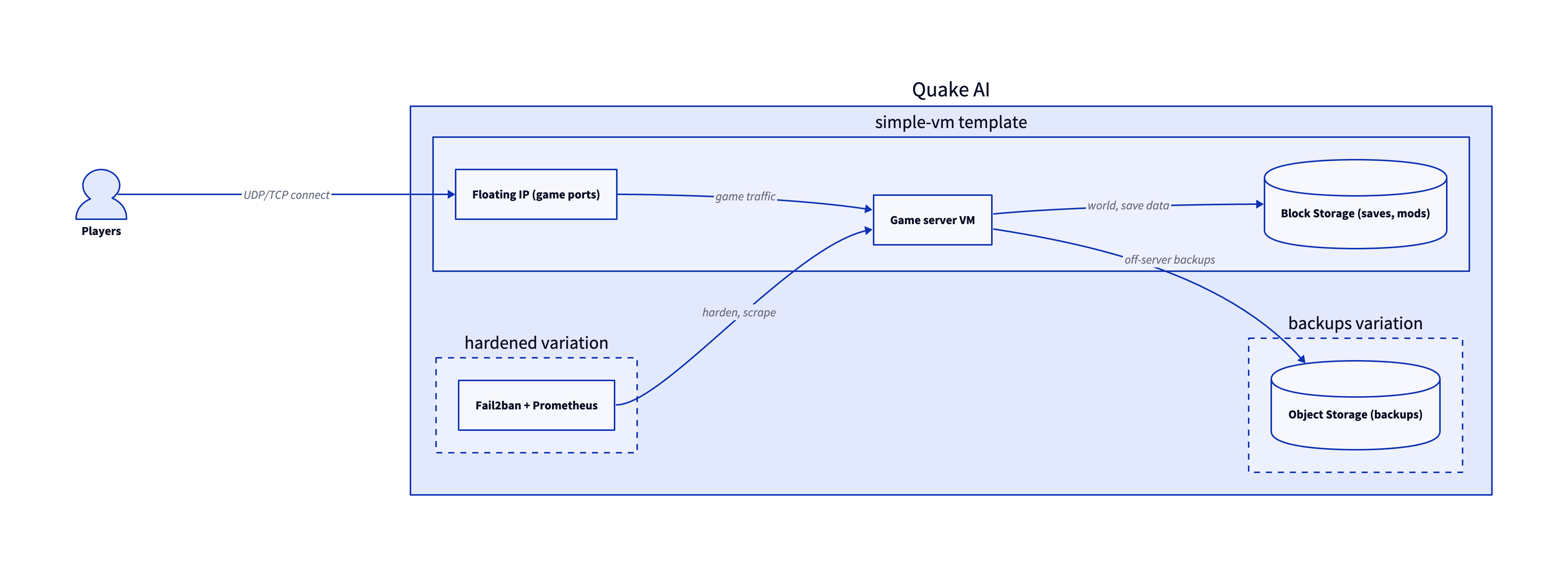
The game server is the simple VM template plus two value-add variations. Each tier maps to the diagram and to the template or how-to that builds it.
-
Game server VM. The server binary runs on a Compute instance, one VM per server instance or per cluster depending on the title. The Minecraft server tutorial is the worked example for this pattern.
-
Block Storage for saves and mods. World files, player inventories, and mod directories persist on a Block Storage volume that survives instance rebuilds. A snapshot schedule captures restore points.
-
Floating IP and security groups. A Floating IP gives players a stable address. Security groups open the title-specific UDP and TCP ports to the public, or to known CIDRs for a private community.
-
Value-add variations. The backups variation writes off-server backup archives and shareable maps to an Object Storage bucket, and the hardened variation adds Fail2ban plus a monitoring stack (Prometheus and Grafana) for player count, tick rate, and resource use. A small Postgres on a sibling VM can hold a player allowlist or Discord-bot state when the community needs it.
Services involved#
| Service | Role in this architecture | Docs |
|---|---|---|
| Compute | Hosts the game server process | Compute |
| Block Storage | World, save, and mod data, with snapshots | Block Storage |
| Object Storage | Off-server backups and shareable maps or mods | Object Storage |
| Network | Routing and connectivity for the server | Network |
| Floating IPs | Stable public address for player connections | Floating IPs |
| Security groups | Open the title-specific UDP and TCP ports | Security groups |
Get started#
- Minecraft server tutorial: the end-to-end worked example for a community server on a single Compute instance.
- Simple VM template and its deploy tutorial: a single Compute instance with attached block storage for any title's server binary.
- Monitoring stack template and its deploy tutorial: Prometheus and Grafana to watch player count, tick rate, and resource use.
- S3 Storage with ACLs template and its deploy tutorial: an Object Storage bucket for save backups and shareable maps.
- Creator businesses: the synthesis pattern for running a creator back end on Quake AI.
- Backup, archive, and object storage: the broader save-data backup story for the same storage tier.
Estimate the cost#
Monthly cost estimate
Pricing calculator ↗Sized as a custom package on shared vCPU.
Monthly total for the required template above. Use the configurator below to add optional pieces and see the total update.
What each resource is for
Vm
s1a.small · 2 shared vCPU, 2 GiB RAM, 0.5 Gbps
Compute shown per role at custom-package rates ($29/dedicated vCPU, $7.25/shared vCPU, $1/GiB RAM). The headline above is the billed total: the cheaper of a named plan and the custom package, plus add-ons.
Included in baseline
s1a.small
2 shared vCPU, 2 GiB RAM, 0.5 Gbps
Compute + RAM rate basis
2 vCPU + 2 GiB RAM at $29/dedicated vCPU, $7.25/shared vCPU, $1/GiB RAM (regular). Totals apply the flat −$5/mo package promotion.
Block storage (20 GiB)
20 GiB at $0.08/GiB/mo
Public IP (included)
1 included with the custom package
Package promotional discount
Flat −$5.00/mo on the custom package (same promotion as named plans).
Included at no charge
These line items are zero on Quake AI. Many other providers meter them separately.
Data transfer (inbound and outbound)
Unlimited data transfer on every plan; Quake AI does not meter per-GB egress.
AWS, GCP, and Azure meter outbound transfer per GB. DigitalOcean and Hetzner include an allowance on compute plans, then charge overage.
Learn morePrivate networking
Private networks, subnets, Neutron routers, and security groups are included with the plan.
VPC objects are usually free to create elsewhere, but NAT gateways bill hourly plus per-GB processed. Quake AI uses router SNAT with no separate NAT line item.
Control-plane API requests
OpenStack API calls for provisioning and management are included.
Some managed services on other clouds meter API calls or charge for premium control-plane features.
Configure your estimate
Check the add-ons you plan to deploy to build a monthly total. Nothing is selected to start, so the total below begins at the baseline.
Starting template
The required baseline, always included.
Pricing data last validated: . For current rates, check quake.ai/pricing.
Migrating an existing game server workload?#
Move game servers that already run on AWS EC2, Azure VMs, Google Compute Engine, or another provider's VM fleet. The outcome is the same server binaries and player-facing endpoints on Quake AI compute, with save data, configuration, and DNS cut over during a maintenance window.
Follow this cutover path. Each step links an existing migration page; this section composes those pages into a workload-shaped sequence rather than duplicating their steps.
-
Map your source provider. Start with the concept-translation page for your current cloud: Coming from AWS, Coming from Azure, Coming from GCP, Coming from DigitalOcean, or Coming from Hetzner.
-
Stand up the target shape on Quake AI. Provision the host and storage with the Simple VM template.
-
Move compute workloads. Rebuild or migrate game server VMs with Migrate from EC2 (or the matching compute migration page for your source provider).
-
Recreate network topology and firewall rules. Translate VPCs, subnets, and security groups with Migrate from AWS VPC (or the matching network migration page for your source provider). Open the UDP and TCP ports your title requires on Quake AI security groups.
-
Cut over player DNS and endpoints. Lower TTL on the player hostname, announce a maintenance window, stop writes on the source server, sync final save data, then switch DNS to the Quake AI address.
Workload-specific cutover callouts#
- Save and state data move. Copy world files, player inventories, and mod directories to block storage on the Quake AI VM before you open the server to players. Run a final sync after you stop the source instance to capture the last writes.
- Server fleet rebuild. When you run multiple shards or regional hosts, rebuild each instance from the same template and restore shard-specific save paths. Confirm mod versions and server binary builds match the source fleet.
- Player DNS and endpoint cutover. Game clients often cache IP addresses. Lower DNS TTL several days before maintenance and post the new hostname in community channels before you flip traffic.
- Maintenance-window switch and rollback. Schedule cutover during low-population hours. Keep the source server offline but intact until error rates and player reports stabilize. Roll back by switching DNS back and restoring the last source save if corruption or connectivity issues appear.
Considerations and limits#
- You operate the server. Quake AI provides compute, network, and storage; the game binary, mods, and save backups are yours under the shared responsibility model.
- Community-scale servers. Run dedicated binaries for Minecraft, Valheim, Factorio, and similar titles on a VM with a floating IP and Block Storage for save data (see the reference architecture above). Quake AI does not provide GameLift-style fleet auto-scaling, demand-based spin-up, or managed matchmaking; AAA-scale fleet operations need a specialized game-server platform.
- No anycast or global-edge latency steering. Three US regions, no cross-region matchmaking. The server's latency to players is bounded by the region you pick; run regional shards for a global community.
- No GPU. Compute is AMD EPYC with no GPU option (compute FAQ). Server binaries that ship without GPU requirements are unaffected; GPU-bound game-engine workloads (rendering, real-time physics at scale) need a different hosting path.
- DDoS protection at the public IP level. Standard cloud-platform DDoS mitigation applies. Competitive servers at the level where targeted DDoS is a real risk layer a DDoS-scrubbing CDN or anycast provider in front.
- Flat egress. Quake AI applies a no-egress-fee policy for outbound transfer, which helps servers with high player bandwidth.
- Compliance posture. Quake AI holds SOC 2 Type I and Type II attestations and SOC 3. See Compliance and certifications for the platform scope.