Media archive and VOD origin
Media archive and VOD origin
Store video masters and packaged derivatives in S3-compatible Object Storage on Quake AI and serve them as a VOD origin behind a third-party CDN. You operate the digital asset management (DAM) tools, encoding pipeline, origin proxy, and CDN configuration; Quake AI provides the Object Storage that holds the library and the Compute that runs transcode workers and origins.
What this is for#
Enterprise media and entertainment archive teams, post-production houses, and creator businesses need a canonical store for video masters and the derivatives they serve. The pattern keeps masters and packaged renditions in S3-compatible Object Storage that S3-compatible tools can read and write, and it serves playback as a VOD origin behind a CDN. Quake AI provides Object Storage and Compute for batch transcode and origin hosts; you operate the DAM, encoding pipeline, origin proxy, and CDN.
Reference architecture#
Download diagram: SVG, PNG, and PDF.
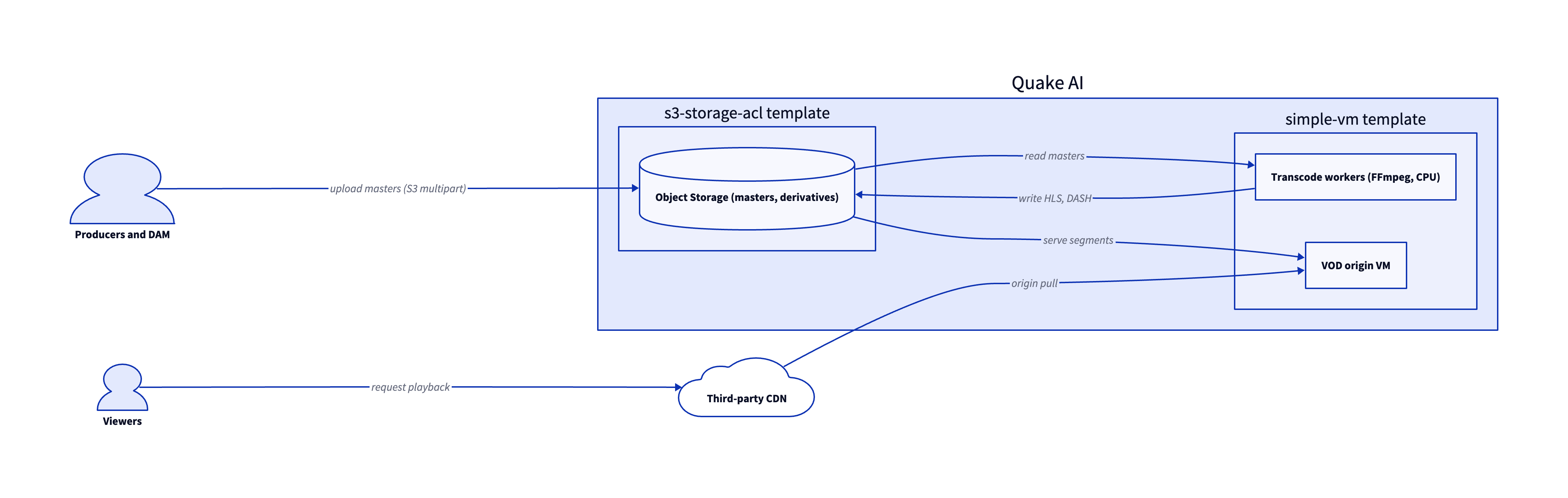
The base architecture is two validated templates: an S3 Storage with ACLs bucket holds the masters and packaged derivatives, and Simple VM Compute instances run the transcode workers and VOD origin. A third-party CDN sits in front of the origin for edge delivery.
-
Upload masters. Editors, capture rigs, and DAM systems upload raw masters from the workstation to S3-compatible Object Storage. Large files use S3 multipart upload; standard tooling such as
aws s3 cp,rclone, ands3cmdworks against the bucket. -
DAM attachment. Third-party DAM tools (Iconik, MediaSilo, LucidLink, or a custom catalog) read and write the same bucket over the S3 API with IAM-scoped credentials, so the asset catalog sits on top of the canonical store.
-
Batch derive. A pool of Compute transcode workers runs FFmpeg to package HLS and DASH derivatives and writes them back to Object Storage. Encoding runs on CPU; size the worker pool for overnight or back-catalog batch jobs.
-
VOD origin. A Compute origin instance reads packaged segments from Object Storage and serves them to a third-party CDN such as Cloudflare, Fastly, or Bunny.net on cache miss. When you run more than one origin VM, route cache misses through an edge reverse proxy on a floating IP. Caddy obtains the origin certificate and routes requests to healthy backends.
-
Access control and integrity. Bucket versioning protects against accidental overwrite of masters, SSE-C and SSE-OMK encryption protect at-rest content, and ACL scoping supports client-facing review-and-approval flows. See Object Storage for the encryption and ACL options.
Services involved#
| Service | Role in this architecture | Docs |
|---|---|---|
| Object Storage | Masters, mezzanine files, and packaged derivatives | Object Storage |
| Compute | CPU transcode workers and origin backends | Compute |
| Block Storage | Scratch volumes for transcode workers | Block Storage |
| Floating IPs | Stable public address for the VOD origin | Floating IPs |
| Edge reverse proxy | TLS termination and routing for origin backends | Edge reverse proxy |
Get started#
- S3 Storage with ACLs template and its deploy tutorial: Object Storage bucket with an ACL policy for masters and derivatives.
- Simple VM template and its deploy tutorial: a Compute instance for a transcode or origin worker.
- Plan your object storage migration: size and sequence a bulk master-library move into Object Storage.
- Creator businesses: the synthesis pattern for running a creator back end on Quake AI.
- Backup, archive, and object storage: the broader backup and archive story for the same Object Storage tier.
- Podcast and audio publishing: the audio-creator pattern that overlaps with media archive.
Estimate the cost#
Monthly cost estimate
Pricing calculator ↗Sized as a custom package on shared vCPU.
Monthly total for the required template above. Use the configurator below to add optional pieces and see the total update.
What each resource is for
Vm
s1a.small · 2 shared vCPU, 2 GiB RAM, 0.5 Gbps
Compute shown per role at custom-package rates ($29/dedicated vCPU, $7.25/shared vCPU, $1/GiB RAM). The headline above is the billed total: the cheaper of a named plan and the custom package, plus add-ons.
Included in baseline
s1a.small
2 shared vCPU, 2 GiB RAM, 0.5 Gbps
Compute + RAM rate basis
2 vCPU + 2 GiB RAM at $29/dedicated vCPU, $7.25/shared vCPU, $1/GiB RAM (regular). Totals apply the flat −$5/mo package promotion.
Block storage (20 GiB)
20 GiB at $0.08/GiB/mo
Public IP (included)
1 included with the custom package
Package promotional discount
Flat −$5.00/mo on the custom package (same promotion as named plans).
Object storage (usage-based)
Object storage
1 bucket. $10.00 per TB each month. You pay for what you store, so this line depends on usage.
Assumes: 2 TB stored is $20/mo; 5 TB stored is $50/mo. Within the included allotment it stays $0.
Included at no charge
These line items are zero on Quake AI. Many other providers meter them separately.
Data transfer (inbound and outbound)
Unlimited data transfer on every plan; Quake AI does not meter per-GB egress.
AWS, GCP, and Azure meter outbound transfer per GB. DigitalOcean and Hetzner include an allowance on compute plans, then charge overage.
Learn moreObject storage upload and download
No separate charges for uploading or downloading object storage data.
Most object storage providers meter egress and API requests separately from stored capacity.
Learn morePrivate networking
Private networks, subnets, Neutron routers, and security groups are included with the plan.
VPC objects are usually free to create elsewhere, but NAT gateways bill hourly plus per-GB processed. Quake AI uses router SNAT with no separate NAT line item.
Control-plane API requests
OpenStack API calls for provisioning and management are included.
Some managed services on other clouds meter API calls or charge for premium control-plane features.
Configure your estimate
Check the add-ons you plan to deploy to build a monthly total. Nothing is selected to start, so the total below begins at the baseline.
Starting template
The required baseline, always included.
Pick how much you expect to store to fold it into the total.
Pricing data last validated: . For current rates, check quake.ai/pricing.
Migrating an existing media workload?#
Move a VOD or media-archive stack that already runs on AWS EC2 and S3, Azure Blob and VMs, Google Cloud Storage and Compute, or another hyperscaler. The outcome is the same media library on Quake AI Object Storage with origin compute and CDN configuration cut over in a controlled order.
Follow this cutover path. Each step links an existing migration page; this section composes those pages into a workload-shaped sequence rather than duplicating their steps.
-
Map your source provider. Start with the concept-translation page for your current cloud: Coming from AWS, Coming from Azure, Coming from GCP, Coming from DigitalOcean, or Coming from Hetzner.
-
Stand up the target shape on Quake AI. Provision the storage bucket and origin with the S3 Storage with ACLs and Simple VM templates.
-
Sync the media library. Copy masters, mezzanine files, and packaged derivatives with Migrate from S3 (or the matching object migration page for your source provider).
-
Move compute workloads. Rebuild or migrate origin and transcode VMs with Migrate from EC2 (or the matching compute migration page for your source provider).
-
Cut over CDN and DNS. Point your third-party CDN at the edge proxy floating IP, verify certificate and cache behavior on sample assets, then lower TTL and switch the public hostname.
Workload-specific cutover callouts#
- Large media-library bucket sync. Plan a bulk object copy with integrity checks (ETag or checksum validation) before you switch the CDN origin. Resume interrupted transfers; spot-check high-value assets after sync completes.
- Origin and edge configuration. Reconfigure your CDN provider to use the Quake AI origin address and update cache key rules for signed URLs or path prefixes your player expects.
- DNS switch. Lower TTL on the origin hostname several days before cutover. Warm the CDN cache on the new origin with representative assets before you announce the migration window.
- Rollback path. Keep the source bucket and origin VMs available until playback error rates stabilize. Roll back by switching the CDN origin and DNS back to the old stack if health checks fail.
Considerations and limits#
- You operate encoding and origin. Quake AI provides Object Storage, Compute, networking, and floating IPs; the DAM, encoding pipeline, packaging, origin proxy, and CDN configuration are yours under the shared responsibility model.
- No GPU encode. Compute is AMD EPYC with no GPU option (compute FAQ). CPU encoding suits back-catalog transcode and overnight batch derive. Real-time, deadline-bound encode runs through a managed encoder in front of the archive.
- CDN integration. Serve viewer-facing playback through a third-party CDN such as Cloudflare, Fastly, Bunny.net, or MUX backed by your origin VM or edge reverse proxy.
- Single storage tier. Object Storage is single-tier, with no cold or archive temperature class. Size storage for a single tier when comparing archive-by-temperature pricing.
- Cross-region copies are customer-driven. There is no automatic cross-region replication. Copy across the three US regions (us-east-1, us-east-2, us-west-1) with
rcloneors3 syncwhen you need a second-region copy. - Compliance posture. Quake AI holds SOC 2 Type I and Type II attestations and SOC 3. Store medical records and payment-card media only when your compliance program covers the gap: the platform does not hold HIPAA or PCI-DSS attestations (Compliance and certifications). Batch archive transcode and VOD origin serving fit this page; sub-second live encode belongs in a live encoder tier you operate or buy in front of this archive.