Notebook workbench
Notebook workbench
Run a composed notebook and experiment-tracking stack on Quake AI: multi-user notebooks, a metadata database, an artifact store, experiment tracking, and a data-app publishing step. Quake AI provides CPU-only Compute, Block Storage, Object Storage, and private networking. Quake AI flavors are AMD EPYC with no GPU option, which fits classic ML, CPU inference, feature engineering, and tracking; see the compute FAQ for flavor details.
Heavy GPU model training is a call out to a backend you choose, the same split the AI inference and RAG brief uses for model inference. The control plane and data layers stay on Quake AI; you point training jobs at SageMaker, a GPU cloud, or an on-prem cluster when the workload needs CUDA.
What this is for#
Data science teams that want notebooks, experiment logs, and internal data apps on infrastructure they control build the stack from templates instead of renting Colab, Weights & Biases, or Streamlit Cloud. Quake AI provides CPU compute for JupyterHub and MLflow, Block Storage for Postgres, and Object Storage for datasets and run artifacts; you operate the hub, the tracking server, and the published apps. The outcome is a self-managed notebook workbench for CPU-bound ML work, deployable from validated OpenTofu templates and their companion deployment pages.
The control plane runs on Quake AI#
A notebook workbench is more than the notebook kernel. The parts that hold state and serve your team fit a flat-priced, always-on CPU tier:
- Multi-user notebooks. JupyterHub spawns isolated CPU notebook containers per analyst or data scientist. Hub state and user volumes live on Block Storage you operate.
- Metadata store. Self-managed Postgres holds MLflow experiment metadata, registry entries, and application tables your notebooks query.
- Artifact and dataset store. S3-compatible Object Storage holds training sets, feature exports, MLflow run artifacts, and serialized models.
- Experiment tracking. MLflow records parameters, metrics, and artifacts from notebook cells or batch jobs, with the UI and registry on a VM you operate.
- Feature store (optional). Feast materializes historical features from Postgres for training and serves low-latency online features from Redis to inference workloads, with the feature registry on a VM you operate.
- Data-app publishing. Streamlit or Gradio hosts dashboards and model demos that query Postgres and Object Storage for stakeholders who do not use notebooks.
GPU training is the one piece you place anywhere: submit jobs from a notebook to SageMaker, a GPU cloud, or your own cluster, then log metrics and artifacts back to MLflow on Quake AI.
Reference architecture#
Download diagram: SVG, PNG, and PDF.
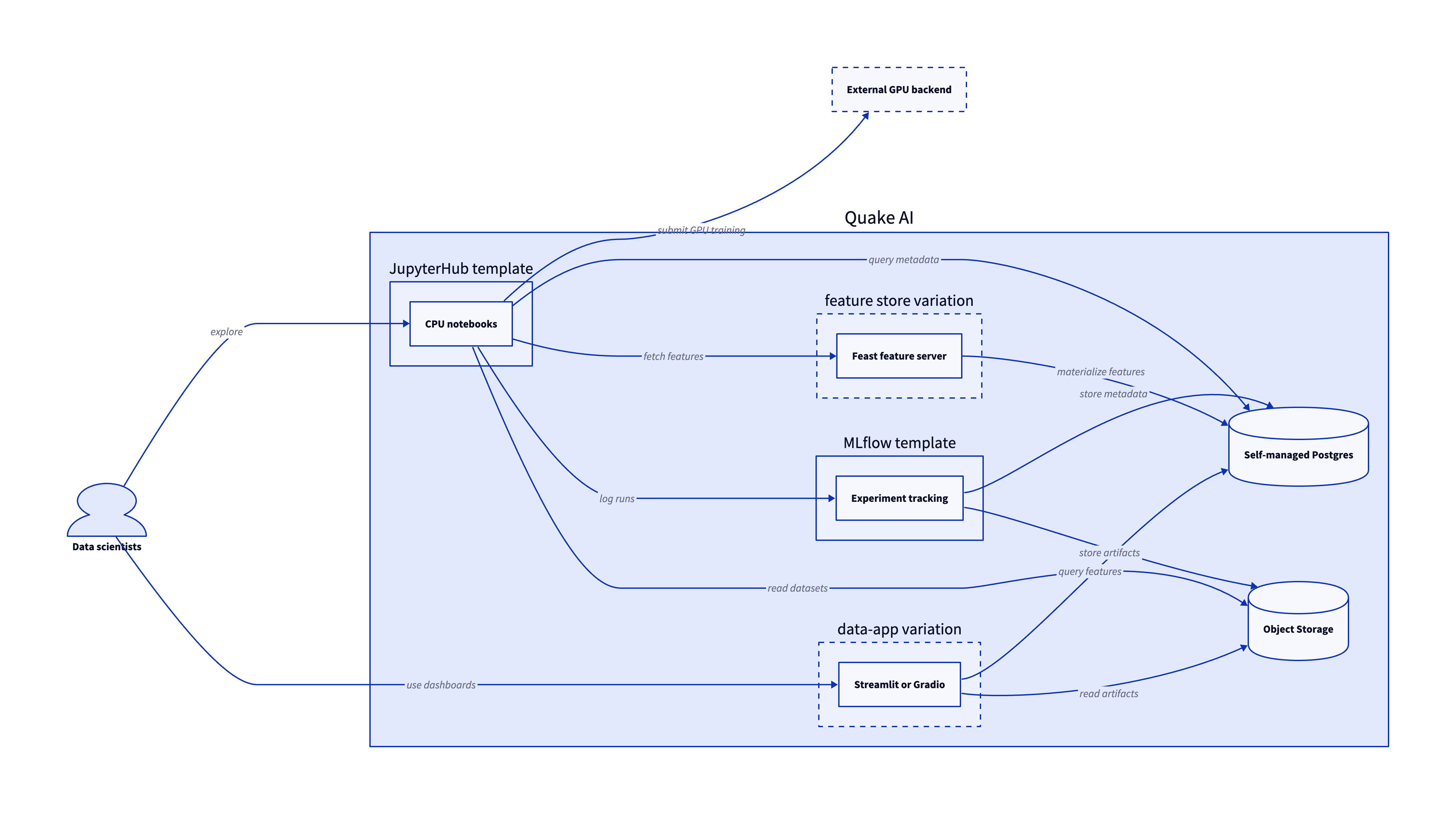
The workbench is five tiers plus optional feature-store, data-app, and GPU additions. Each maps to the diagram and to the template that builds it.
-
Data scientists. Analysts and data scientists open notebooks in JupyterHub, log experiments to MLflow, and share Streamlit or Gradio apps with stakeholders.
-
JupyterHub. Multi-user CPU notebooks run on Compute. The JupyterHub template provisions the hub, DockerSpawner, and per-user scipy notebook containers.
-
Self-managed Postgres. Experiment metadata, registry tables, and feature tables live in Postgres on Block Storage. The self-managed PostgreSQL template scaffolds the database tier MLflow and your apps connect to.
-
Object Storage. Datasets, feature exports, and MLflow artifacts live in S3-compatible Object Storage. Provision a bucket with the S3 Storage with ACLs template or attach an existing container.
-
MLflow. The tracking server and model registry run on Compute. The MLflow template wires the server to your Postgres database and artifact bucket.
-
Feast feature store (optional). The Feast template provisions a feature server backed by Postgres for the offline store and registry and Redis for the online store. Feast materializes features for training in notebooks and serves them to inference workloads. Point
store_modeatexternalto reuse the same self-managed Postgres tier. -
Data apps (optional). Streamlit or Gradio publishes interactive dashboards and model demos. The Streamlit template hosts a CPU-bound Python app; swap the container image for Gradio when your team prefers that widget set.
Services involved#
| Service | Role in this architecture | Docs |
|---|---|---|
| Compute | JupyterHub hub, MLflow tracking server, Feast feature server, and Streamlit or Gradio host (CPU) | Compute |
| Block Storage | Postgres metadata volumes and JupyterHub user data | Block Storage |
| Object Storage | Datasets, feature exports, and MLflow run artifacts | Object Storage |
| Network | Private networks and security groups for hub, tracking, and app tiers | Network |
| Self-managed Postgres | MLflow metadata, registry entries, and app query tables | Self-managed PostgreSQL template |
| Feast feature store | Offline features for training and online features for inference | Feast template |
Get started#
Each template below pairs with a step-by-step deployment page. Stand up Postgres and Object Storage first, then MLflow, then JupyterHub, then optional data apps.
- Self-managed PostgreSQL template and its deploy tutorial: Postgres on Block Storage for MLflow metadata and application tables.
- S3 Storage with ACLs template and its deploy tutorial: Object Storage bucket for datasets and MLflow artifacts.
- MLflow template and its deploy tutorial: experiment tracking and model registry wired to Postgres and Object Storage.
- JupyterHub template and its deploy tutorial: multi-user CPU notebooks that log runs to MLflow.
- Feast template and its deploy tutorial: an optional feature store that serves training and online features from Postgres and Redis.
- Streamlit template and its deploy tutorial: publish dashboards and model demos from Python.
- Upload objects to Object Storage: land datasets and exported features in the artifact bucket.
- OpenTofu template library: browse validated IaC starting points for the tiers above.
Estimate the cost#
Monthly cost estimate
Pricing calculator ↗Sized as a custom package on shared vCPU.
Monthly total for the required template above. Use the configurator below to add optional pieces and see the total update.
What each resource is for
JupyterHub host
s1a.medium · 4 shared vCPU, 4 GiB RAM, 0.5 Gbps
Runs JupyterHub in Docker with DockerSpawner, spawning CPU-only scipy notebook containers per user. Hub state and notebook volumes live on an attached block volume.
JupyterHub plus one concurrent scipy notebook runs on 4 vCPU and 4 GiB RAM (s1a.medium). Size up as more users run notebooks at the same time.
Compute shown per role at custom-package rates ($29/dedicated vCPU, $7.25/shared vCPU, $1/GiB RAM). The headline above is the billed total: the cheaper of a named plan and the custom package, plus add-ons.
Included in baseline
s1a.medium
4 shared vCPU, 4 GiB RAM, 0.5 Gbps
Compute + RAM rate basis
4 vCPU + 4 GiB RAM at $29/dedicated vCPU, $7.25/shared vCPU, $1/GiB RAM (regular). Totals apply the flat −$5/mo package promotion.
Block storage (60 GiB)
60 GiB at $0.08/GiB/mo
Public IP (included)
1 included with the custom package
Package promotional discount
Flat −$5.00/mo on the custom package (same promotion as named plans).
Included at no charge
These line items are zero on Quake AI. Many other providers meter them separately.
Data transfer (inbound and outbound)
Unlimited data transfer on every plan; Quake AI does not meter per-GB egress.
AWS, GCP, and Azure meter outbound transfer per GB. DigitalOcean and Hetzner include an allowance on compute plans, then charge overage.
Learn morePrivate networking
Private networks, subnets, Neutron routers, and security groups are included with the plan.
VPC objects are usually free to create elsewhere, but NAT gateways bill hourly plus per-GB processed. Quake AI uses router SNAT with no separate NAT line item.
Control-plane API requests
OpenStack API calls for provisioning and management are included.
Some managed services on other clouds meter API calls or charge for premium control-plane features.
Configure your estimate
Check the add-ons you plan to deploy to build a monthly total. Nothing is selected to start, so the total below begins at the baseline.
Starting template
The required baseline, always included.
Pricing data last validated: . For current rates, check quake.ai/pricing.
Considerations and limits#
- You operate the workbench. Quake AI provides compute and storage; JupyterHub, MLflow, Feast, Postgres, and the data apps are yours under the shared responsibility model.
- CPU-only compute. Compute is AMD EPYC with no GPU option (compute FAQ). Classic ML (scikit-learn, XGBoost, LightGBM), CPU inference, feature engineering, and experiment tracking fit on Quake AI. Large-scale GPU training and CUDA-dependent deep learning need an external backend; notebooks submit jobs there and log results back to MLflow on Quake AI.
- No managed notebooks or tracking. JupyterHub, MLflow, and Postgres run on Compute and Block Storage you operate. There is no first-party managed notebook or experiment-tracking product.
- Flat egress. Quake AI applies a no-egress-fee policy for outbound transfer, which helps when notebooks pull datasets or push artifacts.
- Three US regions. All current regions are in the United States.
- Compliance posture. Quake AI holds SOC 2 Type I and Type II attestations and SOC 3. See Compliance and certifications for the platform scope.