How to create S3 credentials
Coming from another cloud?
▸AWS·Amazon S3
This Quake AI feature maps to AWS’s Amazon S3.
▸Azure·Blob Storage
This Quake AI feature maps to Azure’s Blob Storage.
▸DigitalOcean·Personal Access Tokens
Personal Access Tokens (PATs) and OAuth2 applications
- DigitalOcean PATs are account-scoped (access all resources across all projects for that account) with a choice of read or read/write scope. OpenStack application credentials are project-scoped and tied to a specific set of roles.
- DO supports OAuth2 for third-party app authorization (apps request access on behalf of a user). OpenStack Keystone supports OAuth1.0 for delegated token issuance; full OAuth2 support depends on the Keystone deployment.
- DO PATs can be set to expire (custom expiry date) or be non-expiring. Keystone token TTL is server-configured, not per-credential.
- DO does not support service accounts independent of a user identity. OpenStack application credentials survive user password changes and can be restricted to specific API operations via access rules.
▸Google Cloud·Storage
This Quake AI feature maps to Google Cloud’s Storage.
▸Hetzner·API Token
API Tokens (project-scoped Bearer tokens)
- Hetzner API tokens are project-scoped: each token is valid only for the project it was created in and must be separately generated per project. OpenStack Keystone application credentials are user-scoped and can be used across projects when the user has appropriate roles.
- Hetzner has no OAuth2/OIDC integration for API access; all programmatic access requires a static bearer token. Keystone supports OIDC federation, LDAP backends, and federated identity (SAML2).
- Hetzner tokens have no built-in expiry and must be manually rotated; there is no token TTL or refresh concept. Keystone tokens have configurable TTLs (default 1 hour) and support re-authentication.
- Hetzner tokens are either read-only or read-write with no fine-grained scope. OpenStack roles (admin, member, reader) provide service-level access control per project.
How to create S3 credentials
Generate EC2-compatible (S3) credentials to access Quake AI Object Storage using S3-compatible tools such as s3cmd, the AWS CLI, rclone, and language SDKs like boto3. S3 credentials are separate from your OpenStack application credentials; they are tied to your user account and work across all your Quake AI projects.
Prerequisites
- ConsoleLogged in to the Quake AI console
- CLIOpenStack CLI installed and authenticated (
clouds.yamloropenrcsourced)
Windows: CLI examples use bash. Set up a Linux CLI environment on Windows before proceeding.
Create S3 credentials#
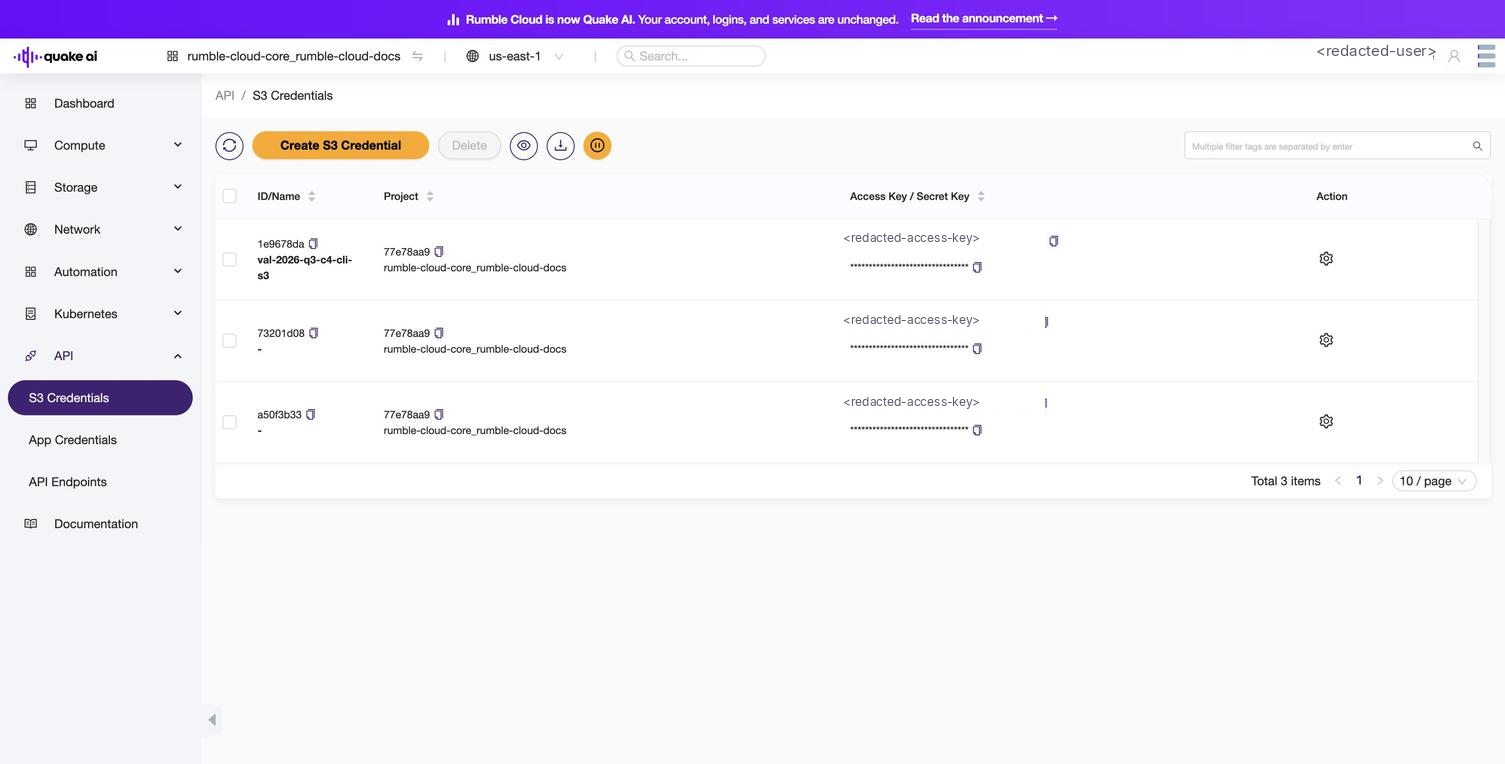
Verify with AWS CLI#
After creating credentials, verify they work by listing your buckets with the AWS CLI. The S3 endpoint depends on your region (for example, https://object.us-east-1.rumble.cloud). See Service Endpoints for all regions.
aws configure set aws_access_key_id YOUR_ACCESS_KEY
aws configure set aws_secret_access_key YOUR_SECRET_KEY

aws s3 ls --endpoint-url https://object.us-east-1.rumble.cloud  # replace with your region
Expected output (if you have existing buckets):
2026-03-15 10:30:00 my-bucket
2026-04-01 14:22:00 backup-bucket
To list objects in a specific bucket:
aws s3 ls s3://my-bucket --endpoint-url https://object.us-east-1.rumble.cloud # replace with your regionConfigure other S3 tools#
s3cmd#
Use the downloaded .cfg file directly:
s3cmd -c s3-CREDENTIAL-NAME.cfg lsOr configure manually. Create ~/.s3cfg:
[default]
access_key = YOUR_ACCESS_KEY
secret_key = YOUR_SECRET_KEY
host_base = object.us-east-1.rumble.cloud    # replace with your region
host_bucket = object.us-east-1.rumble.cloud  # replace with your region
check_ssl_certificate = True
check_ssl_hostname = True
use_https = Truerclone#
rclone config create rumble s3 \
  provider=Other \
  access_key_id=YOUR_ACCESS_KEY \
  secret_access_key=YOUR_SECRET_KEY \
  endpoint=https://object.us-east-1.rumble.cloud  # replace with your region

rclone ls quakeai:my-bucket
boto3 (Python)#
import boto3

s3 = boto3.client(
    "s3",
    endpoint_url="https://object.us-east-1.rumble.cloud",  # replace with your region
    aws_access_key_id="YOUR_ACCESS_KEY",
    aws_secret_access_key="YOUR_SECRET_KEY",
)

response = s3.list_buckets()
print([b["Name"] for b in response["Buckets"]])
See also#
- S3 credentials console reference: view and manage credentials in the console
- API access console reference: overview of the API section
- Service Endpoints: S3 and Swift dual-protocol details
- Create an object storage bucket
- Mount S3 storage
- Object storage concepts
Usage Guidelines
The sample code, software libraries, command line tools, proofs of concept, templates, and other related technology on this page (including any of the foregoing that is provided by Quake AI personnel) is provided to you as Quake AI Content under the Quake AI Customer Agreement, or the relevant written agreement between you and Quake AI (whichever applies). Do not use this Quake AI Content in your production accounts, or on production or other critical data. You are responsible for testing, securing, and optimizing the Quake AI Content (such as sample code) as appropriate for production grade use based on your specific quality control practices and standards. Deploying Quake AI Content may incur Quake AI charges for creating or using Quake AI chargeable resources, such as running Compute instances or storing data in Object Storage. Your use is also subject to the Acceptable Use Policy.
For the full policy, see Usage Guidelines.
Last validated: 08.09.2026
Quick answers
- What is the S3-compatible endpoint hostname?CLIAPI
- Where do I set CORS rules, lifecycle policies, or bucket policies in the Console?Console
- Why do Object Storage API curl examples fail before the first request?API
- Why does my public bucket URL return 404 from the browser after I apply a public-read policy?APIConsole