S3 Credentials
Coming from another cloud?
▸AWS·IAM Access Keys
This Quake AI feature maps to AWS’s IAM Access Keys.
▸Azure·Storage Keys
This Quake AI feature maps to Azure’s Storage Keys.
S3 credentials
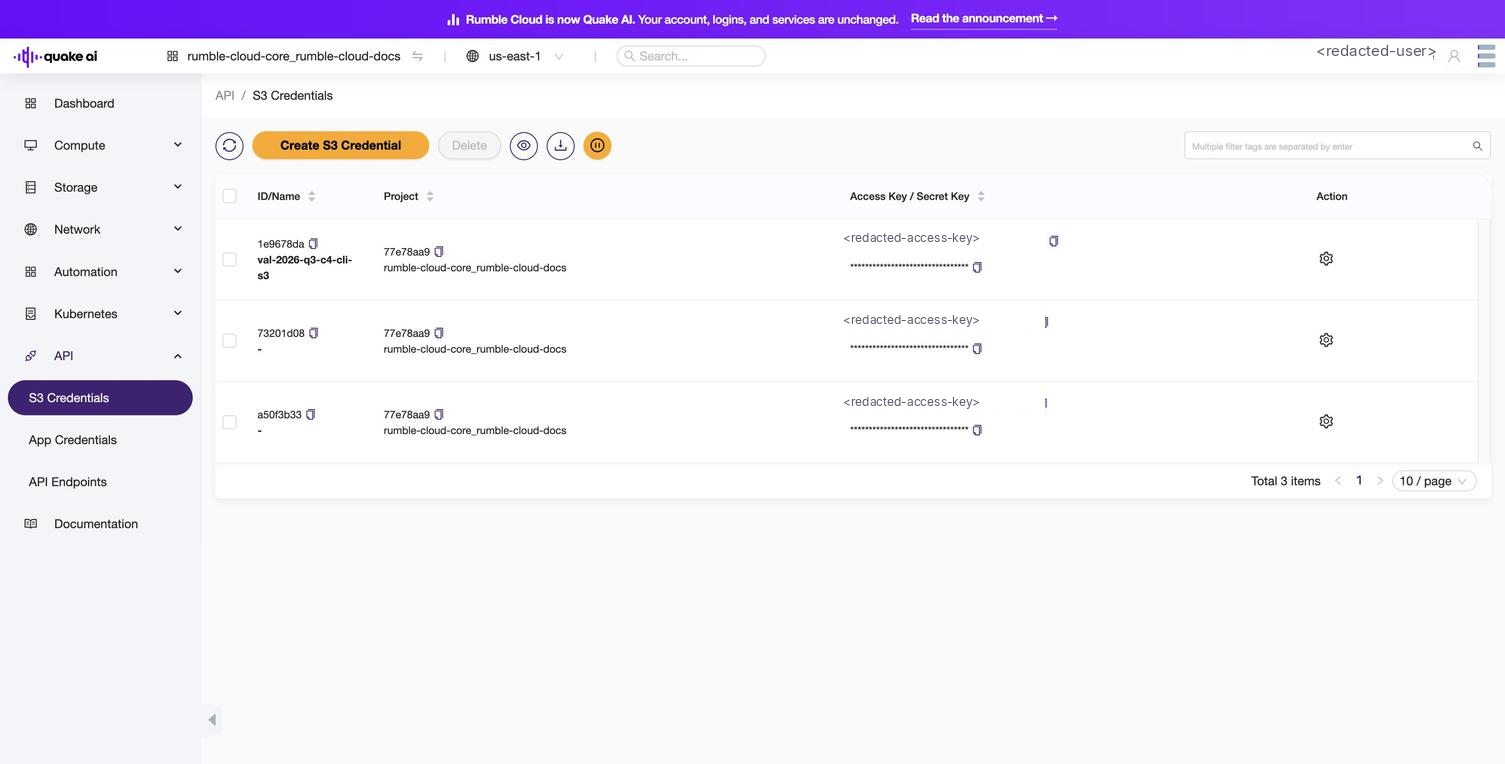
Select API > S3 Credentials ({CONSOLE_REGION_URL}/papi/s3-credentials) to manage your S3-compatible object storage credentials.
S3 credentials are EC2-compatible access keys tied to your user account. Unlike application credentials, which are scoped to a single project, S3 credentials work across your Quake AI projects. Use them with S3-compatible tools such as the AWS CLI, s3cmd, rclone, and boto3.
 Click to zoom
Credential list#
The S3 Credentials page lists your credentials in a table:
| Column | Description |
|---|---|
| ID/Name | Unique identifier and the name you assign at creation |
| Project | The project associated with the credential |
| Access Key / Secret Key | The access key in plain text and the secret key masked, each with its own copy icon |
| Action | The per-row settings menu |
To copy a key, select the copy icon next to the access key or secret key in the Access Key / Secret Key column.
Available actions#
| Action | Description |
|---|---|
| Create S3 Credential | Generate a new access key and secret key pair |
| s3cmd config | Download an s3cmd configuration file (.cfg) for the credential, from the per-row settings menu |
| Delete | Permanently revoke the credential |
Create dialog#
The Create S3 Credential dialog has one required field, Name. Select OK to generate the credential, or Cancel to dismiss the dialog.
After generation, the console displays the credential once and provides:
- The Access and Secret values for the credential.
- A downloadable
s3cmdconfiguration file (.cfg) named after the credential. - A Close button to dismiss the dialog.
S3 endpoint#
Configure S3 tools with the endpoint for your region (for example, https://object.us-west-1.rumble.cloud). Replace us-west-1 with us-east-1 or us-east-2 if your project is in a different region. See Service Endpoints for region endpoints and dual-protocol access details.
See also#
- How to create S3 credentials: step-by-step guide
- API access console reference: overview of the API section
- Service Endpoints: S3 and Swift dual-protocol details
- Mount S3 storage