Application Credentials
Coming from another cloud?
▸AWS·IAM Access Keys
This Quake AI feature maps to AWS’s IAM Access Keys.
▸DigitalOcean·Personal Access Tokens
Personal Access Tokens (PATs) and OAuth2 applications
- DigitalOcean PATs are account-scoped (access all resources across all projects for that account) with a choice of read or read/write scope. OpenStack application credentials are project-scoped and tied to a specific set of roles.
- DO supports OAuth2 for third-party app authorization (apps request access on behalf of a user). OpenStack Keystone supports OAuth1.0 for delegated token issuance; full OAuth2 support depends on the Keystone deployment.
- DO PATs can be set to expire (custom expiry date) or be non-expiring. Keystone token TTL is server-configured, not per-credential.
- DO does not support service accounts independent of a user identity. OpenStack application credentials survive user password changes and can be restricted to specific API operations via access rules.
▸Hetzner·API Token
API Tokens (project-scoped Bearer tokens)
- Hetzner API tokens are project-scoped: each token is valid only for the project it was created in and must be separately generated per project. OpenStack Keystone application credentials are user-scoped and can be used across projects when the user has appropriate roles.
- Hetzner has no OAuth2/OIDC integration for API access; all programmatic access requires a static bearer token. Keystone supports OIDC federation, LDAP backends, and federated identity (SAML2).
- Hetzner tokens have no built-in expiry and must be manually rotated; there is no token TTL or refresh concept. Keystone tokens have configurable TTLs (default 1 hour) and support re-authentication.
- Hetzner tokens are either read-only or read-write with no fine-grained scope. OpenStack roles (admin, member, reader) provide service-level access control per project.
Application credentials
Select API > App Credentials ({CONSOLE_REGION_URL}/papi/application-credentials) to manage application credentials for your current project.
Application credentials authenticate the OpenStack CLI, SDKs, and Terraform without your account password. Each credential is scoped to a single project. You can restrict it to specific roles and set an expiration date.
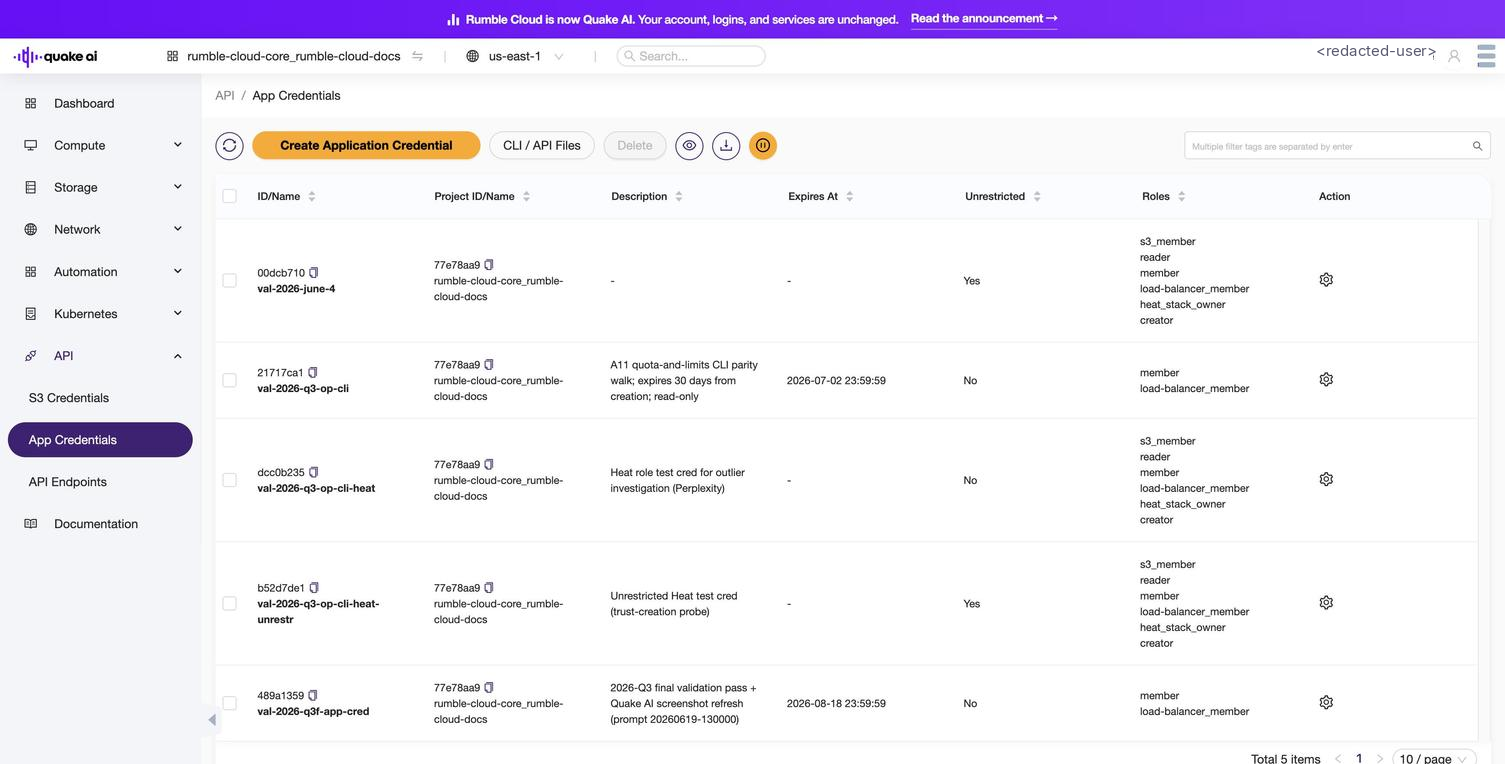 Click to zoom
Credential fields#
| Field | Description |
|---|---|
| ID/Name | Unique identifier and the name you assign at creation |
| Project Id/Name | The project this credential is scoped to |
| Description | Optional description of the credential's purpose |
| Expires At | Expiration timestamp, if set during creation |
| Unrestricted | When enabled, allows managing trusts, other credentials, and Kubernetes clusters |
| Roles | Roles assigned to this credential (empty inherits all your roles) |
Available actions#
| Action | Description |
|---|---|
| Create Application Credential | Generate a new credential ID / secret pair |
| CLI / API Files | Download CLI and API configuration files (such as clouds.yaml and openrc.sh) for the project |
| Delete | Permanently revoke the credential |
The list toolbar also includes icon buttons to refresh the table, view a selected credential's details, download its files, and open inline help.
Using credentials#
Application credentials can be used in two ways:
clouds.yaml: recommended for the OpenStack CLI and SDKs. See the configuration example in How to create application credentials.openrc.sh: downloadable from the creation dialog. Source it in your shell to set environment variables.
CLI commands#
Create an application credential#
openstack application credential create \
  --description "CI pipeline credential" \
  --role member \
  --expiration 2026-12-31T23:59:59 \
MY_APP_CREDENTIAL--role: Restrict to specific roles (repeat for multiple). Omit to inherit all your current roles. See Roles reference for the available role names.--expiration: Optional expiration timestamp in ISO 8601 format.--secret: Provide your own secret instead of generating one.--unrestricted: Allow the credential to create trusts, other credentials, and Kubernetes clusters. Use sparingly. Required for Heat stack creation via the CLI, which needs a Keystone trust.
List application credentials#
openstack application credential listShow application credential details#
openstack application credential show MY_APP_CREDENTIALDelete an application credential#
openstack application credential delete MY_APP_CREDENTIALRoles reference#
The --role flag (CLI) and the role checkboxes (console) restrict a credential to specific roles. The available roles depend on your project; a project's RBAC policy defines what each role grants. A standard us-east-1 project exposes the following roles:
| Role | Typical use |
|---|---|
member | Standard read and write access to project resources |
reader | Read-only access to project resources |
s3_member | Access S3-compatible object storage |
heat_stack_owner | Create and manage Heat orchestration stacks |
Pass the exact role name to --role.
Access rules#
Access rules restrict an application credential to specific API paths. When you set access rules, the credential can only make requests that match them.
List access rules#
openstack access rule listShow access rule details#
openstack access rule show ACCESS_RULE_IDDelete an access rule#
openstack access rule delete ACCESS_RULE_IDCreate access rules as part of application credential create using the --access-rules flag with a JSON array:
openstack application credential create \
  --access-rules '[{"path": "/v2.1/servers", "method": "GET", "service": "compute"}]' \
  READ_ONLY_CREDENTIAL
See also#
- How to create application credentials: step-by-step guide with security best practices
- API access console reference: overview of the API section
- Service Endpoints:
clouds.yamlexample and endpoint discovery - Install OpenStack client