WordPress and CMS hosting
WordPress and CMS hosting
Host self-managed WordPress and other PHP-based content management systems such as Drupal, Joomla, or Ghost on Quake AI. You operate the application, plugins, themes, database, and edge proxy; Quake AI provides compute, networking, block storage, object storage, and floating IPs.
What this is for#
Agencies that host many client sites and single-site operators moving off shared hosting or a managed WordPress vendor need control over the stack and predictable monthly infrastructure cost. Quake AI provides compute, network, and storage; you own the CMS install, edge routing, certificates, updates, security patching, and database backups. The outcome is a self-operated CMS stack with root access, plan-based compute pricing, and flat egress, deployable from a validated OpenTofu template. The architecture applies to WordPress and other PHP-based CMS platforms that pair an application tier with a relational database.
Reference architecture#
Download diagram: SVG, PNG, and PDF.

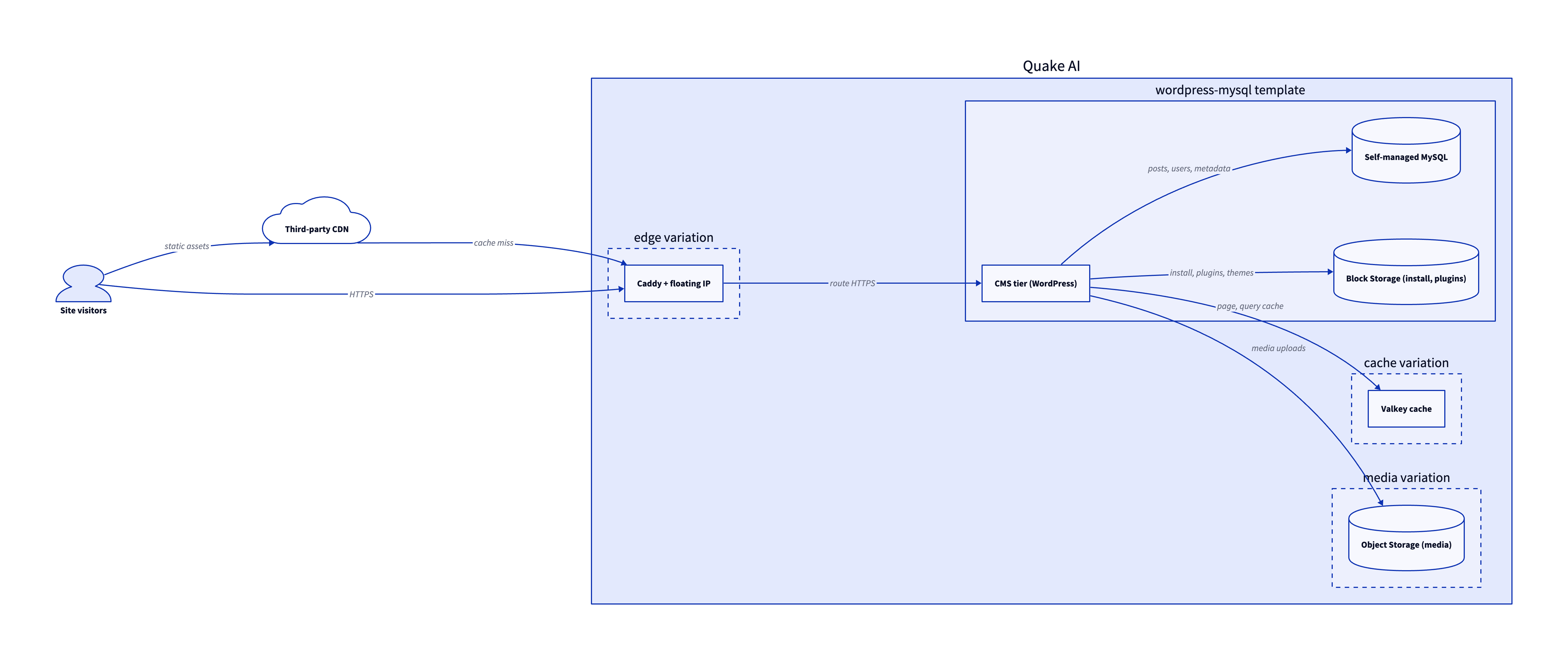
The site is the WordPress + MySQL template plus three value-add variations. Each tier maps to the diagram and to the template or how-to that builds it.
-
Site visitors. Browsers reach the site over HTTPS. A third-party CDN in front of the origin is optional and caches static assets and absorbs traffic spikes.
-
Third-party CDN. A CDN such as Cloudflare, Bunny.net, or Fastly caches pages and static assets and pulls from the origin on cache miss. Quake AI has no native CDN product, so you bring the provider and point cache misses at the site's public address.
-
CMS tier. WordPress (or another PHP CMS) runs on Compute instances, or on a self-managed Kubernetes cluster (Magnum) for agencies running many sites. The application serves pages, handles the admin dashboard, and reads and writes content.
-
Self-managed MySQL. Posts, users, and site metadata live in a self-managed MySQL or MariaDB instance on a separate Compute host, with its data directory on Block Storage. The installation directory, plugins, and themes persist on a Block Storage volume that survives instance rebuilds.
-
Value-add variations. The cache variation adds a Valkey object cache for page and query speed, and the media variation offloads uploads to S3-compatible Object Storage. Add an edge reverse proxy with automatic HTTPS when you want a dedicated public entry point in front of the CMS.
Services involved#
| Service | Role in this architecture | Docs |
|---|---|---|
| Compute | Hosts the CMS application and the database instance | Compute |
| Network | Private networks, routers, and security groups for the site tier | Network |
| Floating IPs | Stable public address for the site or edge VM | Floating IPs |
| Self-managed edge | TLS termination and request routing to the CMS tier | Edge reverse proxy |
| Block Storage | Installation directory, plugins, themes, and MySQL data volume | Block Storage |
| Object Storage | Media uploads, exports, and backups | Object Storage |
| Kubernetes (Magnum) | Optional self-managed cluster for multi-site agencies | Kubernetes |
Get started#
Each template below pairs with a step-by-step deploy tutorial. Start from the template that matches your site count, then follow its tutorial to stand it up.
- WordPress + MySQL template and its deploy tutorial: WordPress with a self-managed MySQL database, the direct starting point for a single site.
- Three-tier app template and its deploy tutorial: separate web, application, and database tiers for larger sites.
- Edge reverse proxy and its deploy walkthrough: Caddy with automatic HTTPS on a floating IP in front of a private CMS origin.
- Simple VM template and its deploy tutorial: a single Compute instance for a small site or a staging environment.
- OpenTofu template library: browse the IaC starting points for the layouts above.
Estimate the cost#
Monthly cost estimate
Pricing calculator ↗Sized as a custom package on a mix of shared and dedicated vCPU.
Monthly total for the required template above. Use the configurator below to add optional pieces and see the total update.
What each resource is for
Wordpress
s1a.small · 2 shared vCPU, 2 GiB RAM, 0.5 Gbps
MySQL database
m2a.large · 2 dedicated vCPU, 8 GiB RAM, 0.5 Gbps
Compute shown per role at custom-package rates ($29/dedicated vCPU, $7.25/shared vCPU, $1/GiB RAM). The headline above is the billed total: the cheaper of a named plan and the custom package, plus add-ons.
Included in baseline
s1a.small
2 shared vCPU, 2 GiB RAM, 0.5 Gbps
m2a.large
2 dedicated vCPU, 8 GiB RAM, 0.5 Gbps
Compute + RAM rate basis
4 vCPU + 10 GiB RAM at $29/dedicated vCPU, $7.25/shared vCPU, $1/GiB RAM (regular). Totals apply the flat −$5/mo package promotion.
Block storage (60 GiB)
60 GiB at $0.08/GiB/mo
Public IP (included)
1 included with the custom package
Package promotional discount
Flat −$5.00/mo on the custom package (same promotion as named plans).
Included at no charge
These line items are zero on Quake AI. Many other providers meter them separately.
Data transfer (inbound and outbound)
Unlimited data transfer on every plan; Quake AI does not meter per-GB egress.
AWS, GCP, and Azure meter outbound transfer per GB. DigitalOcean and Hetzner include an allowance on compute plans, then charge overage.
Learn morePrivate networking
Private networks, subnets, Neutron routers, and security groups are included with the plan.
VPC objects are usually free to create elsewhere, but NAT gateways bill hourly plus per-GB processed. Quake AI uses router SNAT with no separate NAT line item.
Control-plane API requests
OpenStack API calls for provisioning and management are included.
Some managed services on other clouds meter API calls or charge for premium control-plane features.
Dev/test vs production
Start on shared CPU for dev/test, then promote to dedicated for production with a flavor resize. The network, storage, and template stay the same.
Dev/test on shared CPU
Burstable s1a flavors; suited to prototyping and low or bursty load.
Production on the configured CPU
The headline estimate above; predictable steady-load performance.
Saves $49.50/mo while you build on shared CPU.
Shared flavors carry less RAM (m2a.large (8 GiB RAM) -> s1a.small (2 GiB RAM)). A resize reboots the instance; data on attached volumes persists. Size the dedicated flavor for the RAM your production workload needs.
Pricing data last validated: . For current rates, check quake.ai/pricing.
Considerations and limits#
- You operate the CMS. Quake AI provides compute, network, and storage; the CMS install, plugin and theme updates, security patches, and database backups are yours under the shared responsibility model. There is no managed-WordPress product.
- No managed MySQL. The database runs on Compute and Block Storage you operate. Plan a backup and restore process for the database before you put a site into production.
- CDN integration. Serve cached pages and static assets through a third-party CDN in front of the CMS or edge-proxy origin.
- Flat egress. Quake AI applies a no-egress-fee policy for outbound transfer, which helps content sites that serve media and large downloads.
- Three US regions. All current regions are in the United States. A globally distributed audience relies on the CDN layer in front of the origin.
- Compliance posture. Quake AI holds SOC 2 Type I and Type II attestations and SOC 3. See Compliance and certifications for the platform scope.