Cluster templates console
The Cluster Templates page lets you create, inspect, and delete the reusable blueprints that define Kubernetes cluster configuration. Select Services > Kubernetes > Cluster Templates (/container-infra/cluster-template) to access this page.
Template list#
The list view shows the cluster templates available in the current project:
| Column | Description |
|---|---|
| Name | Template name. Select to view template details. |
| ID | Unique identifier assigned to the template. |
| COE | Container orchestration engine, such as kubernetes. |
| Public | Whether the template is visible across projects. |
Use the controls at the top of the list to create a new template or delete selected templates.
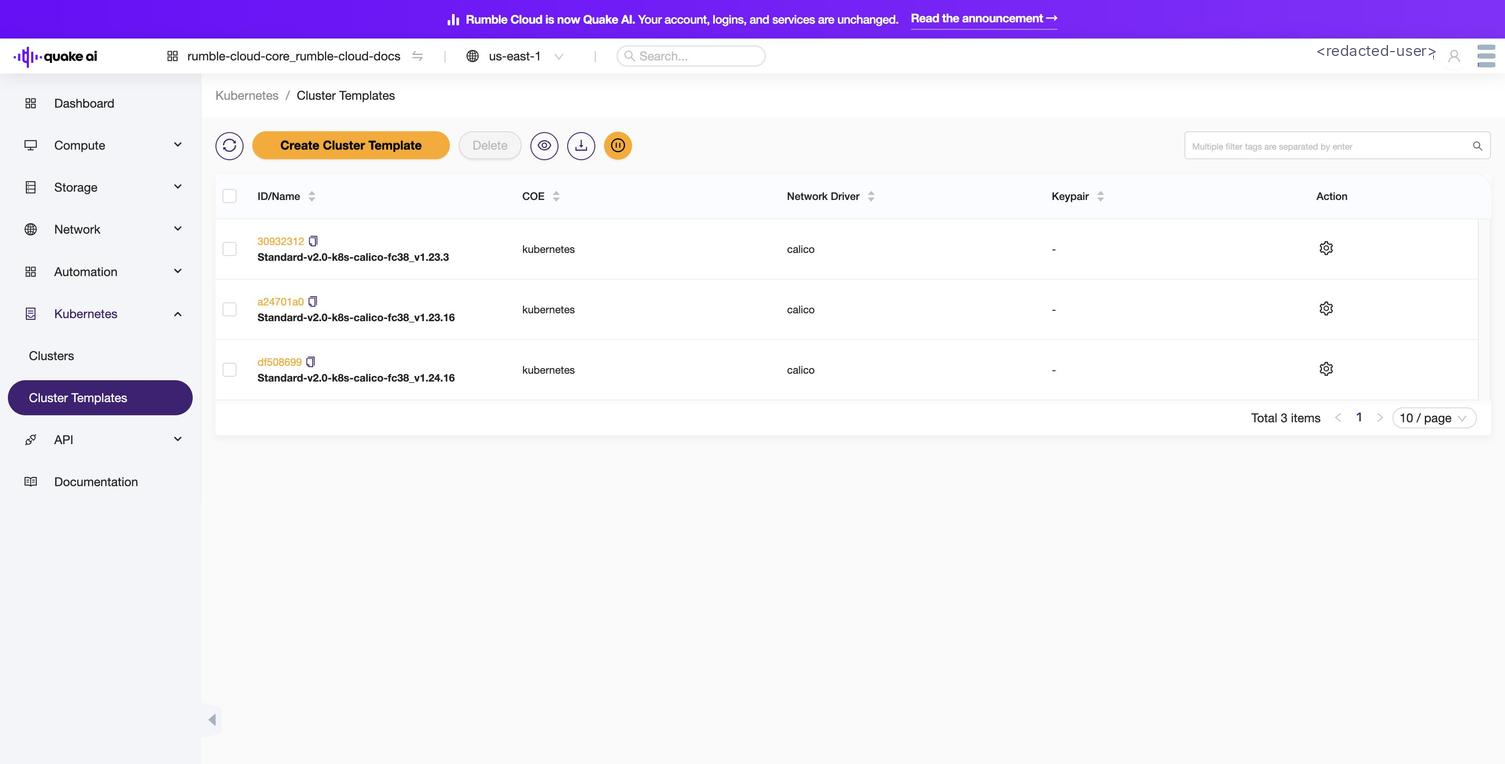 Click to zoom
Quake AI provides three cluster templates:
Standard-v2.0-k8s-calico-fc38_v1.23.3Standard-v2.0-k8s-calico-fc38_v1.23.16Standard-v2.0-k8s-calico-fc38_v1.24.16
Template details#
Select a template name to view its configuration:
Cluster configuration#
| Field | Description |
|---|---|
| Name | Template name. |
| ID | Unique template identifier. |
| COE | Container orchestration engine (kubernetes). |
| Image | Operating system image for cluster nodes, such as Fedora CoreOS. |
| Key Pair | Default SSH key pair for node access. |
| Public | Visibility: true if the template is visible across projects. |
| TLS Disabled | Whether the Kubernetes API has TLS disabled. false means the API uses TLS. |
| Registry Enabled | Whether the template enables an integrated container registry. |
| Server Type | Node server type: vm (virtual machine) or bm (bare metal). |
Node specification#
| Field | Description |
|---|---|
| Flavor | Hardware profile for worker nodes (CPU, RAM, disk). |
| Master Flavor | Hardware profile for control plane nodes. |
| Docker Storage Driver | Storage driver for containers, such as overlay2. |
| Volume Driver | Persistent storage driver. cinder enables Kubernetes PersistentVolumes backed by Block Storage. |
Network configuration#
| Field | Description |
|---|---|
| Network Driver | Container network plugin: calico (supports network policies) or flannel (overlay networking). |
| External Network | Network providing internet connectivity for the cluster. |
| Fixed Network | Internal network for cluster communication. Magnum creates a network when this field has no value. |
| Fixed Subnet | Subnet within the fixed network. |
| DNS Nameserver | DNS server IP for cluster nodes (default: 8.8.8.8). |
| Master LB Enabled | Whether the template creates a load balancer for clusters with multiple control plane nodes. |
| Floating IP Enabled | Whether the template assigns floating IPs to control plane nodes. |
Labels#
Templates can include labels (key-value pairs) that control additional cluster behavior:
| Label | Effect |
|---|---|
kube_dashboard_enabled=true | Enables the Kubernetes Dashboard. |
autoscaler_enabled=true | Enables the Kubernetes Cluster Autoscaler for automatic worker scaling. |
calico_ipv4pool_ipip=Always | Enables IP-in-IP encapsulation for the Calico network plugin. |
flannel_backend=vxlan | Sets the Flannel overlay backend to VXLAN. |
Magnum passes the labels to the container orchestration engine during cluster creation. The Kubernetes documentation describes engine-specific options.
Actions#
| Action | Description |
|---|---|
| Create Cluster Template | Define a new template. See How to create a cluster template. |
| Delete | Remove a template. The Console prevents deletion while an active cluster uses the template. |
Related#
- Kubernetes Console: console overview and page index
- How to create a cluster template
- Kubernetes on Quake AI: architecture and template concepts
- Kubernetes CLI reference