Images console
Overview#
Images are pre-configured files that contain a virtual machine's (VM) operating system and associated data. Images serve as templates for creating instances (VMs) within the Compute service. The Image console is responsible for managing and providing access to these images.
Select Compute > Images to display the images console.
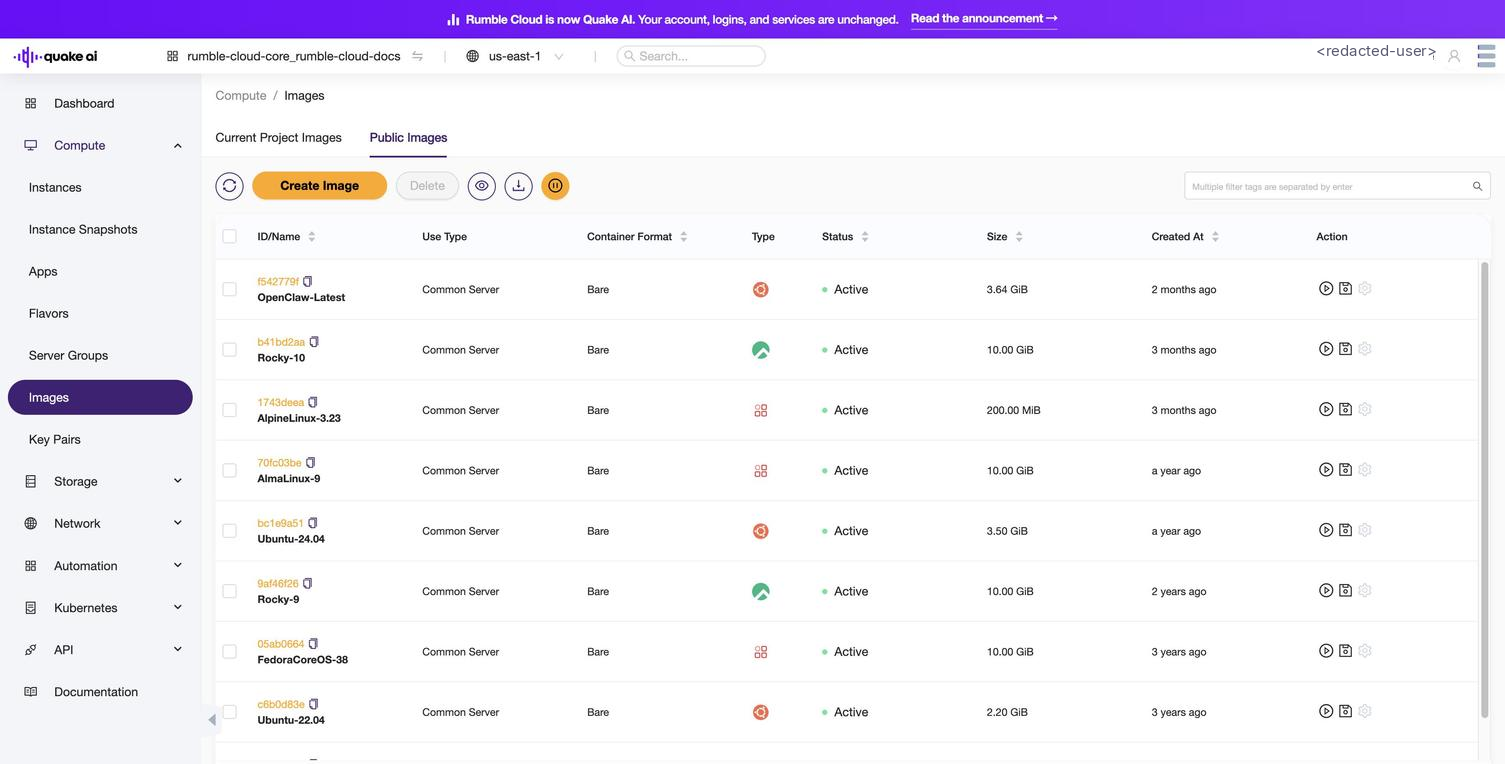 Click to zoom
The console lists all images in your project under the Current Project Images tab.
You can edit and delete images.
You launch an instance based on an image.
You can create a volume based on an image.
Select an image to view image details, security associated with the image, and custom properties associated with the image.
Images details#
You may encounter other custom properties or metadata associated with specific images, depending on how they are configured by the image creator.
| Property/Attribute | Description |
|---|---|
| Name | A human-readable name for the image, used for identification purposes. |
| ID | A unique identifier automatically assigned to the image by OpenStack when it is created. |
| Status | Indicates the current state of the image, such as queued, saving, active, or deleted. |
| Visibility | Determines who can access the image. It can be set to public or private. |
| Protected | A boolean value indicating whether the image is protected from deletion. |
| Disk Format | Specifies the format of the image, such as raw, qcow2, vmdk, or iso. |
| Container Format | Describes the container format of the image, such as bare, ovf, or aki. |
| Size | The size of the image file in bytes. |
| Checksum | A hash value used to verify the integrity of the image file. |
| Tags | A list of user-defined tags that can be associated with the image. |
| Min Disk | The minimum disk size (in GB) required to boot the image. |
| Min RAM | The minimum amount of RAM (in MB) required to boot the image. |
| Architecture | Indicates the architecture for which the image is built, such as x86_64 or arm. |
| Kernel ID | For images that require an external kernel, this attribute specifies the ID of the kernel image. |
| Ramdisk ID | For images that require an external ramdisk, this attribute specifies the ID of the ramdisk image. |
| Owner | The ID of the project or user that owns the image. |
| Created At | The timestamp indicating when the image was created. |
| Updated At | The timestamp indicating when the image was last updated. |
Default images#
Go to Compute > Images > Public Images to view the list of available default images. The us-east-1 catalog as of 20.05.2026 (per openstack image list against project 5462) ships nine images. Use the hyphenated image name (Ubuntu-24.04, not Ubuntu 24.04) when launching instances; the space form is not in the Glance catalog.
-
Ubuntu-24.04 (LTS, Noble): general-purpose Linux image with virtio-scsi and vif_multiqueue_enabled for enhanced performance. Recommended default for new instances. Source: cloud-images.ubuntu.com
-
Ubuntu-22.04 (LTS, Jammy): previous LTS release with virtio-scsi and vif_multiqueue_enabled. Source: cloud-images.ubuntu.com
-
Rocky-9: RHEL-compatible Linux image with virtio-scsi and vif_multiqueue_enabled. Source: dl.rockylinux.org
-
Rocky-10: current Rocky Linux major release. Source: dl.rockylinux.org
-
AlmaLinux-9: second RHEL-compatible distribution alongside Rocky. Source: almalinux.org/get-almalinux
-
AlpineLinux-3.23: minimal musl/busybox image; small footprint, fast boot, common base for container builders and CI runners. Source: alpinelinux.org/downloads
-
Cirros-0.6.2: lightweight test image for sanity testing and CI pipelines. Boots in seconds; not suitable for real workloads. Source: download.cirros-cloud.net
-
FedoraCoreos-38: minimal, auto-updating container host. Magnum Kubernetes cluster templates use it (
Standard-v2.0-k8s-calico-fc38_v*); readers typically do not boot it directly outside a cluster context. Source: builds.coreos.fedoraproject.org -
OpenClaw-Latest: Quake AI's OpenClaw runtime image, used by the OpenClaw app template in the Apps console. See Deploy OpenClaw.
Images service#
Images service CLI reference#
Image service is backed by OpenStack Glance. For details on how Quake AI implements OpenStack, see How Quake AI uses OpenStack.
Images service API reference#
See also#
- Create an image
- OpenStack Image service guides for obtaining and modifying images: